United States Green card Photo Size Requirements
| Passport picture size | Width: 2 inch, Height: 2 inch | ||||||||||||||||||||
| Resolution (DPI) | 600 | ||||||||||||||||||||
| Background color | White | ||||||||||||||||||||
| Printable photo | Yes | ||||||||||||||||||||
| Digital photo for online submission | Yes | ||||||||||||||||||||
| Digital photo size | Width: 1000 pixels , Height: 1000 pixels | ||||||||||||||||||||
| Photo Paper type | matte | ||||||||||||||||||||
| Detailed requirements | United States Green card general requirementsYour photo is a vital part of your Green Card application. The photo must meet all the requirements, such as size, background color and clarity. This ensures that the immigration officials can clearly identify the person in the photo and verify that the photo is a true representation of the applicant.The image file must adhere to the following compositional and technical specifications and can be produced in one of the following ways: taking a new digital image or using a digital scanner to scan a photograph. Image Acquisition
Compositional Specifications:The submitted photo or digital image must conform to the following compositional specifications or the entry will be disqualified. Content
Head Position
Background
Focus/Resolution
Dress
Decorative Items
Head Coverings and Hats
Color photographs in 24-bit color depth are requiredColor photographs may be downloaded from a camera to a file in the computer or they may be scanned onto a computer. If you are using a scanner, the settings must be for True Color or 24-bit color mode. See the additional scanning requirements below. Technical Specifications The submitted digital photograph must conform to the following specifications or the system will automatically reject the E-DV entry form and notify the sender. Taking a New Digital ImageIf a new digital image is taken, it must meet the following specifications:
Scanning a Submitted PhotographBefore a photographic print is scanned, it must meet the compositional specifications listed above. If the photographic print meets the print color and compositional specifications, scan the print using the following scanner specifications:
Copies or digital scans of driver's licenses or other official documents are not acceptable. Which Green Card Photo Do You Need?1. Form I-485 Green Card Photo RequirementsForm I-485 is used by eligible applicants who are applying to register permanent residence or adjust status from inside the United States. USCIS instructions generally require applicants to submit two identical, recent, color passport-style photographs. The photographs should be:
Your head should measure between 1 inch and 1⅜ inches from the top of your hair to the bottom of your chin. USCIS instructions also direct applicants to lightly write their name and A-Number, when applicable, on the back of each photograph using a pencil or felt-tip pen. Always review the latest edition of the Form I-485 instructions before submitting your application. Requirements can change, and some applicants may receive separate biometrics or photograph instructions from USCIS. 2. Immigrant Visa Photo RequirementsApplicants completing Form DS-260 through consular processing must bring two identical printed photographs to their immigrant visa interview. Each photograph must be:
The U.S. embassy or consulate makes the final decision on whether a submitted photograph is acceptable. 3. Diversity Visa Lottery Photo RequirementsDiversity Visa applicants must upload a digital photograph when completing the online DV entry. The photo must be:
The current Diversity Visa requirement is exactly 600 × 600 pixels. Please select DV lottery to make your Diversity Visa photo. If you scan a printed photo for a Diversity Visa entry, the original photograph should be 2 × 2 inches and scanned at 300 pixels per inch. Green Card Photos for Babies and ChildrenA baby or child must be the only person visible in the photograph. For a baby photo:
Another option is to cover a supported child seat with a plain white or off-white sheet. Make Your Green Card Photo OnlinePrepare your U.S. Green Card photo using 123PassportPhoto.
Before submitting the photo, confirm that you selected the correct format for Form I-485, an immigrant visa interview or a Diversity Visa lottery entry. Frequently Asked QuestionsWhat size is a Green Card photo?A printed Green Card application photo is generally 2 × 2 inches, or 51 × 51 millimeters. Digital requirements depend on the application. A Diversity Visa entry photo must be exactly 600 × 600 pixels and no larger than 240 KB. Does a Green Card photo need to be 600 × 600 pixels?Only certain digital applications use this requirement. A Diversity Visa lottery entry requires a 600 × 600 pixel image. Applicants submitting printed photographs for Form I-485 or an immigrant visa interview normally need 2 × 2-inch printed photographs. Can I use a 1000 × 1000 pixel photo?Do not use a 1000 × 1000 pixel photo for a Diversity Visa lottery entry because the current requirement is exactly 600 × 600 pixels. For another digital application, follow the requirements displayed by the official application system. Can I take my Green Card photo with a phone?Yes. A modern smartphone can produce a suitable photograph when the image is sharp, evenly lit and correctly positioned. Use the rear camera when possible. Ask another person to take the photo or place the phone on a tripod to avoid the distortion commonly caused by arm’s-length selfies. Can I smile in my Green Card photo?A neutral expression with both eyes open is recommended. Avoid a broad smile or an open mouth. A neutral expression reduces the risk that the photo will be considered unacceptable. Can I wear glasses?Remove ordinary eyeglasses, reading glasses, sunglasses and tinted glasses. Department of State visa photographs permit glasses only in rare medical circumstances, generally with supporting medical documentation. Can I wear makeup?Normal everyday makeup is generally acceptable when it does not significantly change your appearance. Avoid heavy contouring, theatrical makeup or digital beauty filters that change your facial features or natural skin tone. Can I wear a headscarf?A headscarf or other religious head covering may be worn when it is normally worn for religious purposes. Your entire face must remain visible, and the covering must not create shadows on your face. |
Why 123PassportPhoto?
- Save money: You don't need to pay so much for your passport photo. With 123PassportPhoto service, you can make your own passport photos and print it yourself.
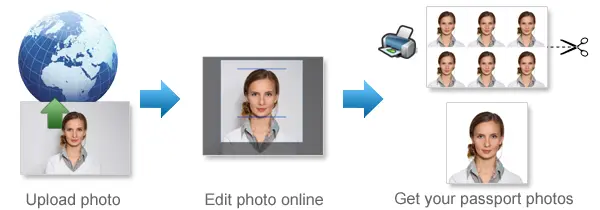
- Save time: Just take a photo using digital camera, then upload and create passport photo with 3 steps. It takes less than 5 minutes to be ready for download.
- White background enhancement: Our premium feature can help you to adjust the photo so that you can get a white background passport photo. Most countries prefer white background passport photos.
- Auto crop with face detection: Our system automatically detects your face and crops the photo to the correct passport size. You can still adjust the cropper manually to get the perfect result.
- Auto background removal: Automatically remove the background from your photo and replace it with the background color your document requires — white, blue or any other required color.
- Ultra high resolution photo: 123PassportPhoto generates passport photos suitable for 600 dpi printing.
- We support 50+ countries such as USA, UK, Ireland, Australia, Canada, France, Germany, Japan, South Africa, Brazil, China, Singapore, Russia, Hong Kong, Netherlands, Argentina and more.
General Passport Photo Requirements
- Neutral facial expression: a. do not open mouth; b. open eyes.
- No glasses; No Hat.
- Don't cover eyebrows with hair.
Find more information on requirements and photo taking tips here.
If you need to edit your photo, you can use our free photo editing tools.
How to Print Passport Photos Using Color Printer
- Download the 4R sheet with multiple photos.
- Check the requirements and use correct 4R photographic paper (matte, semi-matt or glossy paper).
- Print the 4R sheet with no margins. Make sure the 4R picture fit exactly on the 4R photo paper.
- Cut the 4R sheet along the gray lines and you will get multiple photos.
Steps to create passport photos
- Select country and ID photo type, and click Start.
- Upload photo. In order to correctly make passport photo, the picture size should be smaller than 10MB, and the dimensions should be smaller than 4000 x 3000 pixels. The system accepts only .JPG or .JPEG files. The Crop page opens when the photo is uploaded.
- Crop photo to the correct passport photo size dimension.
- If you need white background enhancement, select an enhancement.
- Click the Next button, you will get a printable passport picture which is suitable to be printed on 4R (4x6") photo paper.
- Save the 4R sheet and print it using a photo printer or print it at any photo center.
How to Take Baby Passport Photos
- Lay white or light color baby quilt or blanket in a bright room or other places with good lighting.
- Lay the baby on the quilt or blanket.
- Ensure baby is looking straight at the camera with eyes open, mouth closed and not smiling.
See more tips on taking baby passport photos here.
Passport Photo Size Requirements
- United States Passport Photos Size Requirements
- United Kingdom Passport Photsos Size Requirements
- Australia Passport Photos Size Requirements
Find passport photo requirements for more countries here.
Quick Links to Make Passport Photos
- Make US Passport Photos
- Make UK Passport Photos
- Make Australia Passport Photos
- Make EU Passport Photos
- Make Ireland Passport Photos
- Make Canada Passport Photos
- Make New Zealand Passport Photos
- Make China Passport Photos
- Make India Passport Photos
- Make Singapore Passport Photos
- US Passport Photos Near Me