United States Citizenship (2x2 inch) Photo Size Requirements and Online Tool
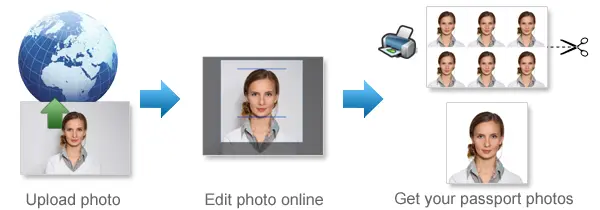
Make United States Citizenship Photos Online Now »
| Passport picture size | Width: 2 inch, Height: 2 inch |
| Resolution (DPI) | 600 |
| Background color | White |
| Printable photo | Yes |
| Digital photo for online submission | Yes |
| Digital photo size | Width: 1000 pixels , Height: 1000 pixels |
| Photo Paper type | matte |
Do not worry about the photo size requirements. Our online tool makes correct photos, ensuring the photo size and head size are correct. Background will be enhanced as well.
Last Update: August 2, 2026
U.S. Citizenship Photo Requirements for Form N-400
Do You Need a Photo for Your U.S. Citizenship Application?
Most Form N-400 applicants living in the United States do not need to upload or mail passport photos with their application.
After USCIS accepts your application, it will notify you if you need to attend a biometrics appointment. At this appointment, USCIS may collect your photograph, fingerprints and signature.
Certain applicants who reside outside the United States may be asked to provide two identical passport-style photographs.
Always follow the latest Form N-400 instructions and any notice sent directly to you by USCIS.
Quick Answer
Applying from inside the United States:
USCIS will normally take your photograph during a biometrics appointment if one is required.
Applying while residing outside the United States:
You may be required to provide two identical recent passport-style photographs.
Received a request from USCIS:
Follow the exact photo instructions in your request, even when they differ from general guidance.
Need to prepare a printed 2×2 photo:
Use our photo tool to crop and size your photograph for printing.
Form N-400 Photo Requirements
When USCIS specifically asks you to submit passport-style photographs, prepare two identical color photos that meet the instructions provided with your application or USCIS notice.
The standard requirements generally include:
-
Photo size: 2 × 2 inches
-
Metric size: approximately 51 × 51 mm
-
Number of photos: two identical photographs, when requested
-
Photo age: taken recently and showing your current appearance
-
Color: full color
-
Background: plain white or off-white
-
Head position: centered and directly facing the camera
-
Expression: neutral, with both eyes open
-
Image quality: clear, properly exposed and in focus
-
Paper: photo-quality paper
-
Alterations: no filters or changes to your natural appearance
Do not submit a photograph unless the Form N-400 instructions or USCIS specifically require one for your filing situation.
Applicants Living in the United States
If you live in the United States and file Form N-400, USCIS will notify you if biometric information is required.
Your biometric information may include:
-
A digital photograph
-
Fingerprints
-
Your signature
The appointment notice will provide the date, time and location of your biometrics appointment. Bring the appointment notice and the identification documents requested by USCIS.
You should not prepare separate passport photos unless your application instructions or a USCIS notice tells you to do so.
Applicants Living Outside the United States
Certain applicants residing outside the United States may need to submit two identical passport-style color photographs.
If this applies to you, check the current Form N-400 instructions carefully. USCIS may also send you a request for physical photographs with specific submission instructions.
Do not rely only on general passport-photo information. The instructions for your form and filing location take priority.
Common Citizenship Photo Problems
A photograph may be considered unacceptable when:
-
It is the wrong size
-
The face is too large or too small
-
The head is tilted or turned
-
The photograph is blurry
-
The image has been digitally altered
-
The background is not plain
-
There are shadows on the face or background
-
The applicant is wearing glasses
-
The applicant’s eyes are closed
-
The photograph does not show the applicant’s current appearance
-
The image has poor lighting or inaccurate colors
-
Objects or other people appear in the photograph
-
The photograph was printed on ordinary office paper
Review your photograph carefully before printing or submitting it.
Prepare a 2×2 Citizenship Photo
Use 123PassportPhoto when your USCIS instructions require a printed 2×2 passport-style photograph.
Our tool can help you:
-
Crop the photograph to a square format
-
Position the head within the photograph
-
Prepare a 2×2-inch layout
-
Create a printable photo sheet
-
Print multiple copies on standard photo paper
For the best result, start with a clear, unedited photograph taken against a plain white or off-white background.
The tool helps prepare and size your photograph, but USCIS makes the final decision about whether a photo is acceptable.
How to Print Your Citizenship Photos
When printed photographs are required:
-
Prepare the photograph in the required 2×2-inch size.
-
Print it on matte or glossy photo-quality paper.
-
Make sure the photograph is not stretched or distorted.
-
Check that the colors and skin tone appear natural.
-
Do not cut into the face or required photo area.
-
Prepare two identical copies when USCIS requests two photographs.
-
Follow any instructions about writing information on the back of the photographs.
Do not use ordinary copier paper or low-quality ink that produces lines, fading or inaccurate colors.
Frequently Asked Questions
Do I need to send passport photos with Form N-400?
Most applicants living in the United States do not need to send passport photos with Form N-400. USCIS will notify you if it needs to collect your photograph at a biometrics appointment.
Certain applicants residing outside the United States may be asked to provide two passport-style photographs.
Does USCIS take my photo at the biometrics appointment?
USCIS may collect your photograph, fingerprints and signature at a biometric services appointment. USCIS will send you an appointment notice if biometrics are required.
How many photos do I need for Form N-400?
When physical photographs are required, USCIS may request two identical passport-style color photographs. Follow the current Form N-400 instructions or your USCIS notice.
What size is a U.S. citizenship photo?
A standard passport-style photograph is 2 × 2 inches, or approximately 51 × 51 mm.
Only prepare this photo when your filing instructions or USCIS notice requires it.
Can I upload a digital photo with Form N-400?
Do not assume that a digital photo upload is required. The photo process depends on your filing situation and current USCIS instructions.
Most applicants in the United States have their photograph collected through biometrics when required.
Can I use a passport photo for my citizenship application?
A recent U.S.-style passport photograph may be suitable when USCIS specifically asks for a 2×2 passport-style photo.
The photograph must still meet the requirements in your Form N-400 instructions or USCIS notice.
Can I take my citizenship photo with a phone?
Yes, a phone camera can produce a suitable photograph when the image is clear, properly lit, in focus and taken against a plain white or off-white background.
Do not use portrait filters, beauty settings or software that changes your natural appearance.
Can I remove the background digitally?
It is safer to take the original photograph against a plain white or off-white background. Digital background replacement can create unnatural edges, shadows or other alterations.
Avoid editing that changes your appearance or makes the photograph look artificial.
Can I smile in my citizenship photo?
Use a neutral, natural expression with both eyes open. Avoid an exaggerated smile or any expression that changes your normal facial appearance.
Are glasses allowed?
Glasses should generally be removed for a U.S. passport-style photograph unless a government authority accepts a documented medical exception.
Can I wear a religious head covering?
A religious head covering may generally be worn when it does not obscure your facial features or cast shadows over your face.
Should I print on matte or glossy paper?
Printed photographs may be produced on matte or glossy photo-quality paper. Do not use ordinary office paper.
How recent should my photo be?
Use a recent photograph that accurately reflects your current appearance. When USCIS gives you a specific time limit, follow that instruction.
Source: https://travel.state.gov/en/passports/apply/help/photos.html
For other U.S. document photo requirements, please check the links below:
United States Passport 2x2 inch (51x51 mm, 5.1x5.1 cm)
United States DV lottery 2x2 inch (51x51 mm, 5.1x5.1 cm)
United States Green card 2x2 inch (51x51 mm, 5.1x5.1 cm)
United States NY MTA Metrocard for Seniors 1.5x2 inch
United States NY Gun License 1.5x1.5 inch
If you want to make passport/visa photos for other countries, click the button below.
Make Passport/Visa Photo for Other Countries
How to make United States Citizenship photo online
Step 1: Take a picture with a digital camera or a smartphone
Make sure someone takes your passport photo for you. Selfies are not accepted. Make use of your tripod if you have one. By using a tripod, you will be able to keep the camera level and steady. Ideally, the person should be around 1 meter away from the camera.
Step 2: Choose a venue with appropriate lighting
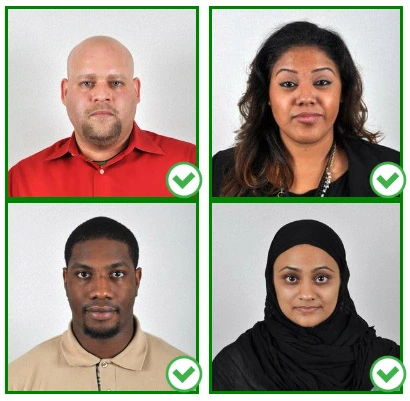
Face a bright window or the door when taking a photo. In this way, shadows can be avoided on the face and in the background. It is essential that the face is evenly lit. Ensure that the face is free of shadows and glares.
Note: You do not need to worry about the background, since our online passport photo generator will automatically do it for you.
Step 3: Dress appropriately for your passport photo
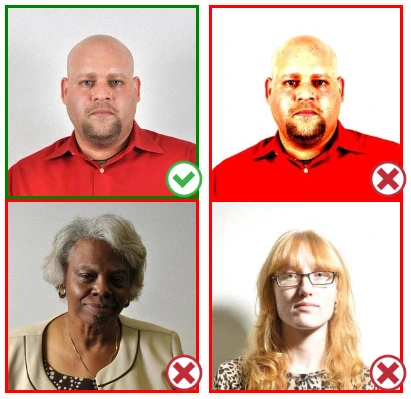
Uniforms should not be worn. Put on regular street clothes for your photo.
Eyeglasses should not be worn. You should remove any sunglasses, tinted glasses, or glasses that you wear if you are taking a passport photo.
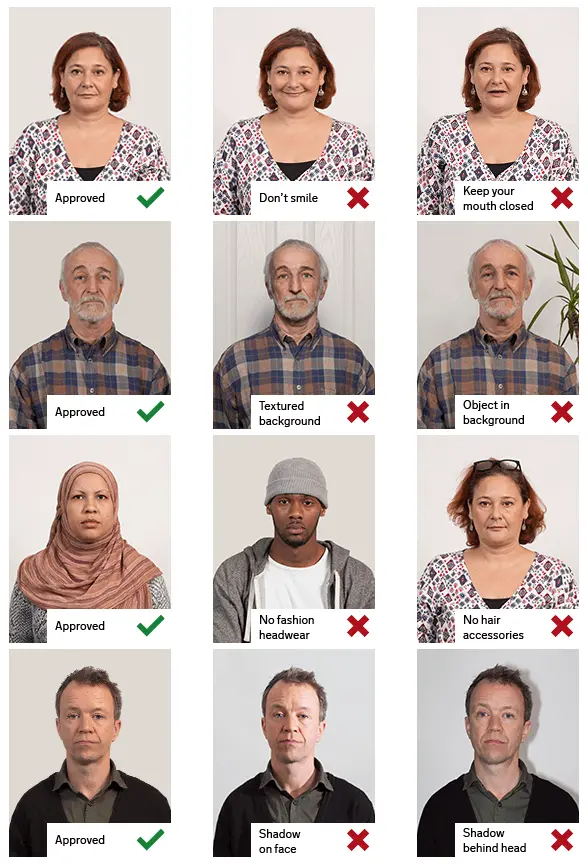
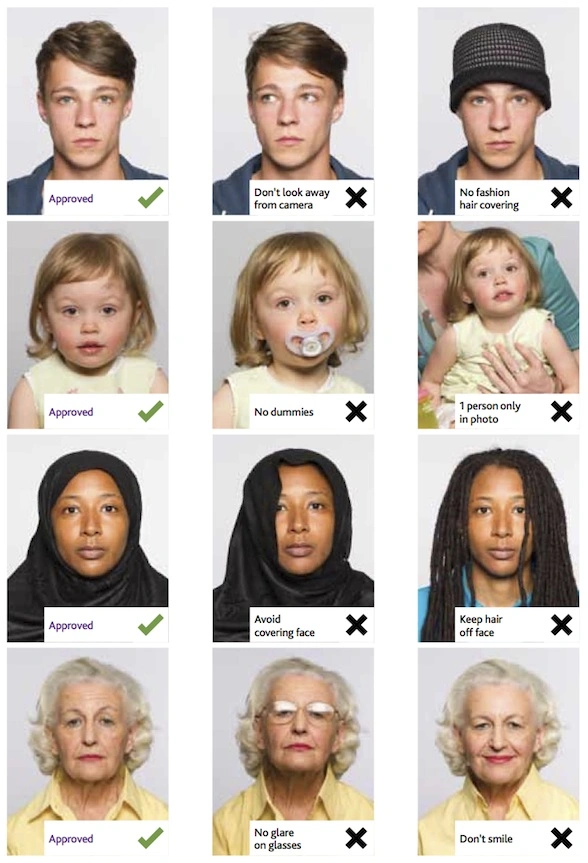
Ensure that your face is fully visible. Make sure your hair doesn't cover your face or obscure your eyes. In the case of very long bangs covering your eyebrows, pin them back with bobby pins. Although it's better to show your ears as well, that won't stop your photo from being accepted.
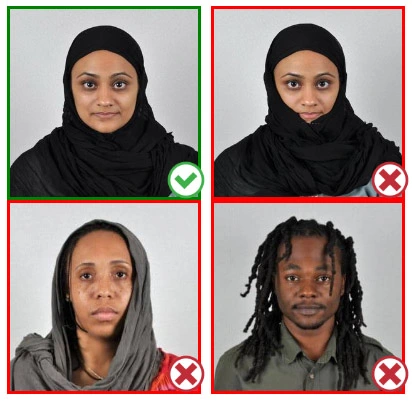
Passport photos don't allow hats unless they're religious headgear such as a headscarf or yarmulke.
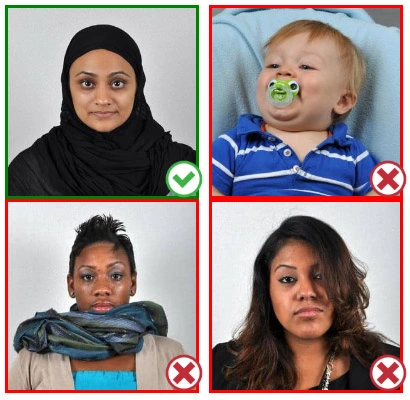
Step 4: Pose for a passport photo
Face the camera straight on and look straight at it. Avoid tilting or rotating the head.
It is important that the shoulders are visible, and there should be enough space around the head to crop the picture.
Make sure the camera is at the same level as the head.
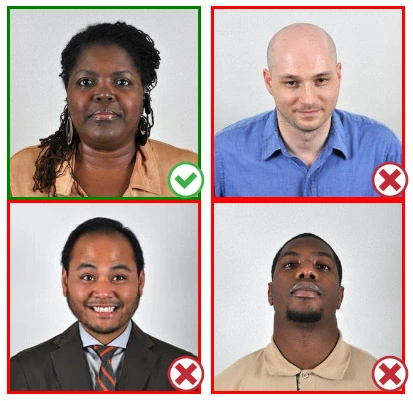
Step 5: Maintain neutral facial expressions
The government prefers you to have a neutral facial expression.
Under the new international passport rules, it is usually not acceptable to smile or have your mouth open.
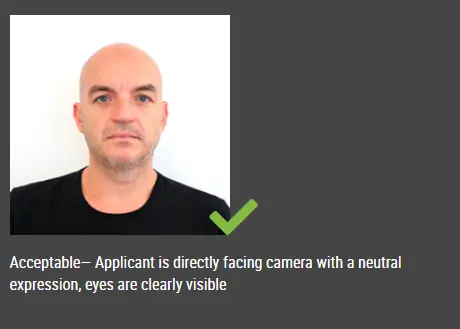
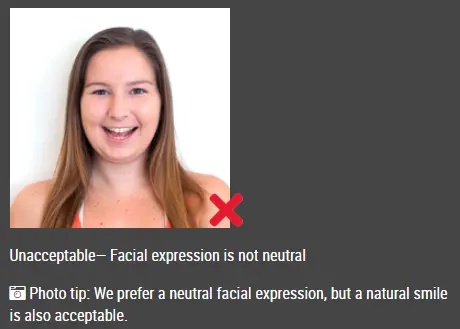
Good and bad examples of passport photos
This document is rated 5 / 5 - 3 Votes