United States DV lottery Photo Size Requirements
| Passport picture size | Width: 2 inch, Height: 2 inch |
| Resolution (DPI) | 600 |
| Background color | White |
| Printable photo | Yes |
| Digital photo for online submission | Yes |
| Digital photo size | Width: 600 pixels , Height: 600 pixels |
| Photo Paper type | matte |
| Detailed requirements | United States DV lottery Photo RequirementsIf you are entering the Diversity Visa (DV) Program online, you must upload your digital image as part of your entry.It is required that all photographs of you, your spouse, and your derivative children be taken within the past six months. You will not be eligible for a DV if you submit the same photograph as a previous entry. Your DV lottery photo must meet all the following requirements:
It is not acceptable to use photos copied from driver's licenses or other official documents.
In addition, Diversity Lottery Green Card photo has to meet the following requirements: When you apply for the Diversity Visa (DV) Program online, .Your digital image must be:
If you want to scan an existing,in addition to the digital image requirements, your existing photo must be:
If you are selected,Two (2) identical photos must be brought to the interview by each DV applicant.Your photos must be:
Take the photo yourself You may take the photo yourself. Photos must not be digitally enhanced or altered to change your appearance in any way.
Common Reasons DV Lottery Photos Get RejectedA photo may be rejected if it doesn’t meet one or more of the official requirements. The most common issues include:
Review your finished file carefully before submitting your entry. DV Lottery Photos for Your Spouse and ChildrenEach person listed in your Diversity Visa entry needs their own recent photo that meets the official requirements. This includes:
Make sure you don’t reuse the same photo for different people, even if they were taken at the same time. Each image should be uploaded and checked separately before submission. DV Lottery Baby Photo RequirementsBabies and young children must be photographed on their own, with no one else visible in the frame. The photo should not include:
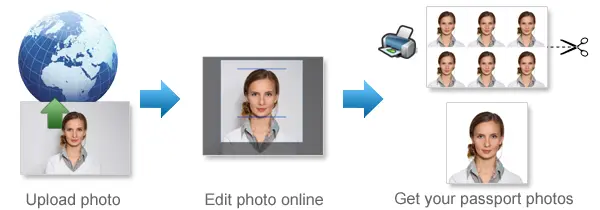
A simple way to take the photo is to lay the baby on a plain white or light-colored sheet, or place them in a car seat covered with a plain cloth. Try to have the baby facing the camera as naturally as possible. Eyes open is preferred, but for very young infants this is not always required. If anything is visible in the frame that shouldn’t be there, don’t try to edit it out—just take a new photo instead. How Our DV Lottery Photo Tool WorksThe DV Lottery photo tool at 123PassportPhoto.com automatically formats your portrait according to official Diversity Visa photo requirements. It crops and resizes your image to 600 × 600 pixels, replaces the background with a plain white or off-white color, and prepares the final photo as an sRGB JPEG file within the required file-size limit. Choose your service Select the country/region and photo type you need. Upload your photoTake a clear selfie or portrait and upload it to 123PassportPhoto.com. Process your photoYour photo is automatically cropped, resized, and adjusted to meet DV Lottery specifications. Download your photoDownload your entry-ready 600 × 600-pixel DV Lottery photo and use it for your application.
Frequently Asked Questions
What size should a DV Lottery photo be? The digital image must be exactly 600 pixels wide and 600 pixels high. It must have a square 1:1 aspect ratio.
What is the maximum DV Lottery photo file size? The JPEG image must not exceed 240 KB.
Can I use a passport photo for the DV Lottery? You may be able to use a recent passport-style photo if it meets all current Diversity Visa digital-image requirements, including the 600 × 600-pixel dimensions and 240 KB file-size limit. Do not assume that every passport photo is automatically suitable.
Can I use a selfie? A selfie is not recommended because close camera positioning can distort your face and make correct alignment difficult. A better approach is to ask another person to photograph you from several feet away with the camera held at eye level.
Can I smile in my DV Lottery photo? Use a neutral facial expression with your mouth closed and both eyes open. Avoid a broad or exaggerated smile.
Can I wear glasses? Eyeglasses are generally not permitted. Rare medical exceptions may apply when the glasses cannot be removed.
Can I reuse last year’s DV Lottery photo? Use a new photo taken within the last six months. Your image should accurately reflect your current appearance.
Does every family member need a photo? Yes. Each eligible person included in the entry needs an individual photo that meets the requirements.
|
Why 123PassportPhoto?
- Save money: You don't need to pay so much for your passport photo. With 123PassportPhoto service, you can make your own passport photos and print it yourself.
- Save time: Just take a photo using digital camera, then upload and create passport photo with 3 steps. It takes less than 5 minutes to be ready for download.
- White background enhancement: Our premium feature can help you to adjust the photo so that you can get a white background passport photo. Most countries prefer white background passport photos.
- Auto crop with face detection: Our system automatically detects your face and crops the photo to the correct passport size. You can still adjust the cropper manually to get the perfect result.
- Auto background removal: Automatically remove the background from your photo and replace it with the background color your document requires — white, blue or any other required color.
- Ultra high resolution photo: 123PassportPhoto generates passport photos suitable for 600 dpi printing.
- We support 50+ countries such as USA, UK, Ireland, Australia, Canada, France, Germany, Japan, South Africa, Brazil, China, Singapore, Russia, Hong Kong, Netherlands, Argentina and more.
General Passport Photo Requirements
- Neutral facial expression: a. do not open mouth; b. open eyes.
- No glasses; No Hat.
- Don't cover eyebrows with hair.
Find more information on requirements and photo taking tips here.
If you need to edit your photo, you can use our free photo editing tools.
How to Print Passport Photos Using Color Printer
- Download the 4R sheet with multiple photos.
- Check the requirements and use correct 4R photographic paper (matte, semi-matt or glossy paper).
- Print the 4R sheet with no margins. Make sure the 4R picture fit exactly on the 4R photo paper.
- Cut the 4R sheet along the gray lines and you will get multiple photos.
Steps to create passport photos
- Select country and ID photo type, and click Start.
- Upload photo. In order to correctly make passport photo, the picture size should be smaller than 10MB, and the dimensions should be smaller than 4000 x 3000 pixels. The system accepts only .JPG or .JPEG files. The Crop page opens when the photo is uploaded.
- Crop photo to the correct passport photo size dimension.
- If you need white background enhancement, select an enhancement.
- Click the Next button, you will get a printable passport picture which is suitable to be printed on 4R (4x6") photo paper.
- Save the 4R sheet and print it using a photo printer or print it at any photo center.
How to Take Baby Passport Photos
- Lay white or light color baby quilt or blanket in a bright room or other places with good lighting.
- Lay the baby on the quilt or blanket.
- Ensure baby is looking straight at the camera with eyes open, mouth closed and not smiling.
See more tips on taking baby passport photos here.
Passport Photo Size Requirements
- United States Passport Photos Size Requirements
- United Kingdom Passport Photsos Size Requirements
- Australia Passport Photos Size Requirements
Find passport photo requirements for more countries here.
Quick Links to Make Passport Photos
- Make US Passport Photos
- Make UK Passport Photos
- Make Australia Passport Photos
- Make EU Passport Photos
- Make Ireland Passport Photos
- Make Canada Passport Photos
- Make New Zealand Passport Photos
- Make China Passport Photos
- Make India Passport Photos
- Make Singapore Passport Photos
- US Passport Photos Near Me