Nigeria Passport Photo Size Requirements
| Passport picture size | Width: 35 mm, Height: 45 mm | ||||||||||||||||||
| Resolution (DPI) | 600 | ||||||||||||||||||
| Background color | White | ||||||||||||||||||
| Printable photo | Yes | ||||||||||||||||||
| Digital photo for online submission | Yes | ||||||||||||||||||
| Digital photo size | Width: 600 pixels , Height: 800 pixels | ||||||||||||||||||
| Photo Paper type | matte | ||||||||||||||||||
| Detailed requirements | Nigeria Passport Photo Size and RequirementsFor an online Nigerian passport application, prepare a digital photograph with these key specifications:
The photograph should show a natural and accurate representation of the applicant. Avoid filters, beauty effects, excessive retouching or alterations that change facial features. What Should the Photograph Look Like?The applicant should be positioned in the middle of the frame, with the head straight and the face directed towards the camera. The final image should have:
Do not submit a photograph taken from the side or at an angle. The camera should be level with the applicant’s face. White Background RulesUse a plain, spotless white background for a Nigerian passport photograph. The area behind the applicant should be free from patterns, furniture, curtains, doors, other people, dark patches and visible objects. Leave some space between the applicant and the wall or backdrop to reduce shadows around the head and shoulders. Lighting and Camera QualityProper lighting helps produce a clear and acceptable passport photograph. The applicant’s face should be evenly illuminated, without appearing overly bright, too dark, faded or partially hidden by shadows. Soft natural light is often the best choice. Position the applicant so that daylight falls gently across the front of the face. Avoid harsh overhead lighting and do not stand directly in front of a bright window, as this can create glare, strong contrast or an underexposed face. Before taking the photograph, clean the camera lens and check that the face is in sharp focus. Do not use an image that looks blurred, grainy, pixelated or low in resolution. Correct Facial ExpressionMaintain a neutral expression while looking directly at the camera. Keep the mouth closed and avoid laughing, frowning or smiling broadly. A slight natural expression may be acceptable, but a neutral face is more suitable for biometric identification. Both eyes should be open and clearly visible. Hair and Facial VisibilityHair should be moved away from the face. It should not cover the eyes, eyebrows, cheeks or ears. Applicants with long hair may place it behind the ears or tie it back. Large hairstyles should not prevent the face from being centred or properly framed. The photograph must clearly show the applicant’s facial outline. What to Wear for a Nigerian Passport PhotoChoose ordinary clothing that stands out against the white background. Dark, neutral or medium-coloured clothing usually works well. White shirts and very pale tops are best avoided because they can blend into the background. Do not wear:
The photograph should look natural and should not create the impression that the applicant is wearing an official uniform. Glasses, Sunglasses and Contact LensesFor the clearest result, remove glasses before taking the passport photograph. Sunglasses and tinted lenses are not permitted because the eyes must remain fully visible. Prescription glasses may also create glare, reflections or shadows that affect the image. If glasses must be worn, check that:
Avoid coloured or decorative contact lenses that noticeably change the natural appearance of the eyes. Headscarves and Religious Head CoveringsA religious or medically required head covering may be worn, provided it does not interfere with facial recognition. The covering should leave the full face visible, including the forehead, eyes, nose, cheeks, mouth and chin. It must not create shadows or cover any part of the face. Fashion hats, caps and non-essential headwear should be removed. Printed Nigerian Passport Photo DimensionsFor printed applications, a 35 × 45 mm photograph is commonly requested. This measurement may not apply in every situation. Passport offices, Nigerian embassies, consulates and application centres may have different instructions regarding photo dimensions and the number of copies required. Are Selfies Accepted for a Nigeria Passport Application?A standard arm-length selfie is unlikely to produce the best result. Holding the camera close to the face can make the nose appear larger and distort the shape of the head. It can also create an incorrect camera angle and an uneven crop. For a more professional result, use a tripod, phone stand or another person. Place the camera directly in front of the applicant at eye height. Passport Photos for Children Under FiveYoung children may not be able to maintain the same expression and posture as adults. Some flexibility may therefore apply to their facial expression and positioning. However, the photograph should still show the child looking generally towards the camera, with the face located near the centre of the image. Select a photograph in which the child is calm, clearly visible and not moving. Avoid Cropping the Photo IncorrectlyThe head should not be cut off at the top, and the chin should not touch the bottom edge of the photograph. At the same time, the applicant should not appear too far away. A photo showing most of the body may not provide enough facial detail for biometric processing. Use a balanced head-and-shoulders composition with the face placed centrally. How our Online Nigeria Passport Photo Tool WorksOur passport photo generator follows these steps:
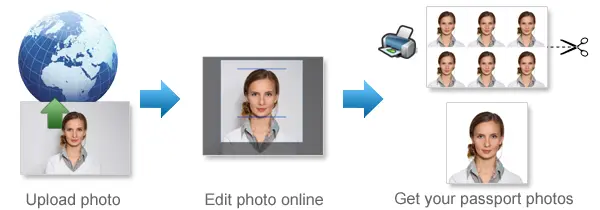
Automated preparation can make the process easier, but the applicant remains responsible for checking that the final photograph meets the application requirements. Frequently Asked QuestionsWhat resolution is required for a Nigeria passport photograph?The digital photograph should measure 600 × 800 pixels for submission through the Nigeria Immigration Service passport portal. How large can the passport photo file be?The image file should be less than 2 MB. Which background colour should I use?Use a solid white background with no visible pattern, object or shadow. What is the printed Nigeria passport photograph size?A size of 35 × 45 mm is widely used for printed photographs. Applicants should verify the exact requirement with their passport office, embassy or consulate. Should my ears show in the photograph?Keep the ears and facial outline visible by moving long or loose hair away from the sides of the face. Is smiling allowed?A neutral expression with the mouth closed is recommended. This reduces the risk of problems with biometric photo assessment. Can I wear prescription glasses?Removing them is recommended. When they must be worn, the eyes should remain visible and the lenses must not reflect light. Can I edit my photograph before uploading it?Basic cropping, resizing and background replacement may be used. Avoid facial reshaping, beauty filters and edits that change the applicant’s natural appearance. What file format should I upload?Use a commonly supported image format, such as JPEG or PNG. Confirm that the image remains under the file-size limit after saving.
Source: https://passport.immigration.gov.ng/image-compliance |
Why 123PassportPhoto?
- Save money: You don't need to pay so much for your passport photo. With 123PassportPhoto service, you can make your own passport photos and print it yourself.
- Save time: Just take a photo using digital camera, then upload and create passport photo with 3 steps. It takes less than 5 minutes to be ready for download.
- White background enhancement: Our premium feature can help you to adjust the photo so that you can get a white background passport photo. Most countries prefer white background passport photos.
- Auto crop with face detection: Our system automatically detects your face and crops the photo to the correct passport size. You can still adjust the cropper manually to get the perfect result.
- Auto background removal: Automatically remove the background from your photo and replace it with the background color your document requires — white, blue or any other required color.
- Ultra high resolution photo: 123PassportPhoto generates passport photos suitable for 600 dpi printing.
- We support 50+ countries such as USA, UK, Ireland, Australia, Canada, France, Germany, Japan, South Africa, Brazil, China, Singapore, Russia, Hong Kong, Netherlands, Argentina and more.
General Passport Photo Requirements
- Neutral facial expression: a. do not open mouth; b. open eyes.
- No glasses; No Hat.
- Don't cover eyebrows with hair.
Find more information on requirements and photo taking tips here.
If you need to edit your photo, you can use our free photo editing tools.
How to Print Passport Photos Using Color Printer
- Download the 4R sheet with multiple photos.
- Check the requirements and use correct 4R photographic paper (matte, semi-matt or glossy paper).
- Print the 4R sheet with no margins. Make sure the 4R picture fit exactly on the 4R photo paper.
- Cut the 4R sheet along the gray lines and you will get multiple photos.
Steps to create passport photos
- Select country and ID photo type, and click Start.
- Upload photo. In order to correctly make passport photo, the picture size should be smaller than 10MB, and the dimensions should be smaller than 4000 x 3000 pixels. The system accepts only .JPG or .JPEG files. The Crop page opens when the photo is uploaded.
- Crop photo to the correct passport photo size dimension.
- If you need white background enhancement, select an enhancement.
- Click the Next button, you will get a printable passport picture which is suitable to be printed on 4R (4x6") photo paper.
- Save the 4R sheet and print it using a photo printer or print it at any photo center.
How to Take Baby Passport Photos
- Lay white or light color baby quilt or blanket in a bright room or other places with good lighting.
- Lay the baby on the quilt or blanket.
- Ensure baby is looking straight at the camera with eyes open, mouth closed and not smiling.
See more tips on taking baby passport photos here.
Passport Photo Size Requirements
- United States Passport Photos Size Requirements
- United Kingdom Passport Photsos Size Requirements
- Australia Passport Photos Size Requirements
Find passport photo requirements for more countries here.
Quick Links to Make Passport Photos
- Make US Passport Photos
- Make UK Passport Photos
- Make Australia Passport Photos
- Make EU Passport Photos
- Make Ireland Passport Photos
- Make Canada Passport Photos
- Make New Zealand Passport Photos
- Make China Passport Photos
- Make India Passport Photos
- Make Singapore Passport Photos
- US Passport Photos Near Me