Nigeria Passport (35x45 mm) Photo Size Requirements and Online Tool
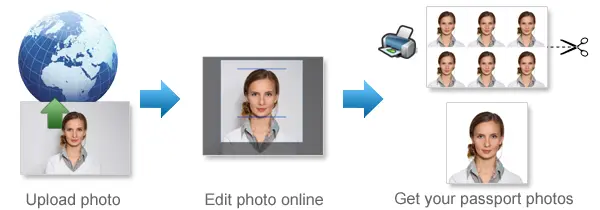
Make Nigeria Passport Photos Online Now »
| Passport picture size | Width: 35 mm, Height: 45 mm |
| Resolution (DPI) | 600 |
| Background color | White |
| Printable photo | Yes |
| Digital photo for online submission | Yes |
| Digital photo size | Width: 600 pixels , Height: 800 pixels |
| Photo Paper type | matte |
Do not worry about the photo size requirements. Our online tool makes correct photos, ensuring the photo size and head size are correct. Background will be enhanced as well.
Last Update: July 20, 2026
Nigeria Passport Photo Size and Requirements
For an online Nigerian passport application, prepare a digital photograph with these key specifications:
| Requirement | Recommended specification |
|---|---|
| Digital resolution | 600 pixels wide × 800 pixels high |
| File size | Under 2 MB |
| Background | Solid white |
| Head position | Upright, centred and facing forward |
| Lighting | Balanced across the entire face |
| Photo quality | Clear, sharp and properly focused |
| Facial visibility | Face and ears should not be covered |
| Accessories | No masks, headphones or face-obscuring items |
The photograph should show a natural and accurate representation of the applicant. Avoid filters, beauty effects, excessive retouching or alterations that change facial features.
What Should the Photograph Look Like?
The applicant should be positioned in the middle of the frame, with the head straight and the face directed towards the camera.
The final image should have:
-
A complete and unobstructed view of the face
-
Open and visible eyes
-
A closed mouth and relaxed expression
-
Natural skin tones
-
Clear facial details
-
Sufficient space around the head
-
An appropriate head-and-shoulders crop
Do not submit a photograph taken from the side or at an angle. The camera should be level with the applicant’s face.
White Background Rules
Use a plain, spotless white background for a Nigerian passport photograph. The area behind the applicant should be free from patterns, furniture, curtains, doors, other people, dark patches and visible objects.
Leave some space between the applicant and the wall or backdrop to reduce shadows around the head and shoulders.
Lighting and Camera Quality
Proper lighting helps produce a clear and acceptable passport photograph. The applicant’s face should be evenly illuminated, without appearing overly bright, too dark, faded or partially hidden by shadows.
Soft natural light is often the best choice. Position the applicant so that daylight falls gently across the front of the face. Avoid harsh overhead lighting and do not stand directly in front of a bright window, as this can create glare, strong contrast or an underexposed face.
Before taking the photograph, clean the camera lens and check that the face is in sharp focus. Do not use an image that looks blurred, grainy, pixelated or low in resolution.
Correct Facial Expression
Maintain a neutral expression while looking directly at the camera.
Keep the mouth closed and avoid laughing, frowning or smiling broadly. A slight natural expression may be acceptable, but a neutral face is more suitable for biometric identification.
Both eyes should be open and clearly visible.
Hair and Facial Visibility
Hair should be moved away from the face. It should not cover the eyes, eyebrows, cheeks or ears.
Applicants with long hair may place it behind the ears or tie it back. Large hairstyles should not prevent the face from being centred or properly framed.
The photograph must clearly show the applicant’s facial outline.
What to Wear for a Nigerian Passport Photo
Choose ordinary clothing that stands out against the white background.
Dark, neutral or medium-coloured clothing usually works well. White shirts and very pale tops are best avoided because they can blend into the background.
Do not wear:
- Military clothing
- Police uniforms
- Official-looking uniforms
- Clothing that covers the lower face
- Large scarves around the mouth or chin
The photograph should look natural and should not create the impression that the applicant is wearing an official uniform.
Glasses, Sunglasses and Contact Lenses
For the clearest result, remove glasses before taking the passport photograph.
Sunglasses and tinted lenses are not permitted because the eyes must remain fully visible. Prescription glasses may also create glare, reflections or shadows that affect the image.
If glasses must be worn, check that:
- Both eyes are clearly visible
- The lenses are transparent
- No glare or reflection appears
- The frames do not cover any part of the eyes
Avoid coloured or decorative contact lenses that noticeably change the natural appearance of the eyes.
Headscarves and Religious Head Coverings
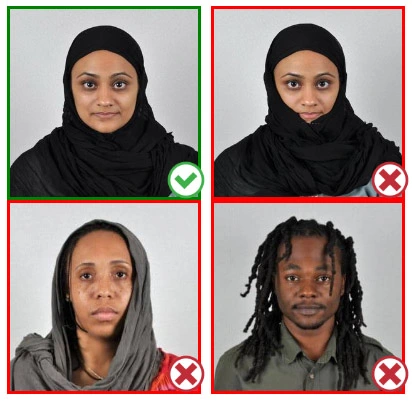
A religious or medically required head covering may be worn, provided it does not interfere with facial recognition.
The covering should leave the full face visible, including the forehead, eyes, nose, cheeks, mouth and chin. It must not create shadows or cover any part of the face.
Fashion hats, caps and non-essential headwear should be removed.
Printed Nigerian Passport Photo Dimensions
For printed applications, a 35 × 45 mm photograph is commonly requested.
This measurement may not apply in every situation. Passport offices, Nigerian embassies, consulates and application centres may have different instructions regarding photo dimensions and the number of copies required.
Are Selfies Accepted for a Nigeria Passport Application?
A standard arm-length selfie is unlikely to produce the best result.
Holding the camera close to the face can make the nose appear larger and distort the shape of the head. It can also create an incorrect camera angle and an uneven crop.
For a more professional result, use a tripod, phone stand or another person. Place the camera directly in front of the applicant at eye height.
Passport Photos for Children Under Five
Young children may not be able to maintain the same expression and posture as adults. Some flexibility may therefore apply to their facial expression and positioning.
However, the photograph should still show the child looking generally towards the camera, with the face located near the centre of the image.
Select a photograph in which the child is calm, clearly visible and not moving.
Avoid Cropping the Photo Incorrectly
The head should not be cut off at the top, and the chin should not touch the bottom edge of the photograph.
At the same time, the applicant should not appear too far away. A photo showing most of the body may not provide enough facial detail for biometric processing.
Use a balanced head-and-shoulders composition with the face placed centrally.
How our Online Nigeria Passport Photo Tool Works
Our passport photo generator follows these steps:
-
The applicant uploads an original photograph.
-
The software identifies the face and head position.
-
The image is cropped to passport-photo proportions.
-
The existing background is removed.
-
An appropiate background is applied.
-
The photograph is resized to the selected format.
-
A digital file or printable sheet is created.
Automated preparation can make the process easier, but the applicant remains responsible for checking that the final photograph meets the application requirements.
Frequently Asked Questions
What resolution is required for a Nigeria passport photograph?
The digital photograph should measure 600 × 800 pixels for submission through the Nigeria Immigration Service passport portal.
How large can the passport photo file be?
The image file should be less than 2 MB.
Which background colour should I use?
Use a solid white background with no visible pattern, object or shadow.
What is the printed Nigeria passport photograph size?
A size of 35 × 45 mm is widely used for printed photographs. Applicants should verify the exact requirement with their passport office, embassy or consulate.
Should my ears show in the photograph?
Keep the ears and facial outline visible by moving long or loose hair away from the sides of the face.
Is smiling allowed?
A neutral expression with the mouth closed is recommended. This reduces the risk of problems with biometric photo assessment.
Can I wear prescription glasses?
Removing them is recommended. When they must be worn, the eyes should remain visible and the lenses must not reflect light.
Can I edit my photograph before uploading it?
Basic cropping, resizing and background replacement may be used. Avoid facial reshaping, beauty filters and edits that change the applicant’s natural appearance.
What file format should I upload?
Use a commonly supported image format, such as JPEG or PNG. Confirm that the image remains under the file-size limit after saving.
Source: https://passport.immigration.gov.ng/image-compliance
If you want to make passport/visa photos for other countries, click the button below.
Make Passport/Visa Photo for Other Countries
How to make Nigeria Passport photo online
Step 1: Take a picture with a digital camera or a smartphone
Make sure someone takes your passport photo for you. Selfies are not accepted. Make use of your tripod if you have one. By using a tripod, you will be able to keep the camera level and steady. Ideally, the person should be around 1 meter away from the camera.
Step 2: Choose a venue with appropriate lighting
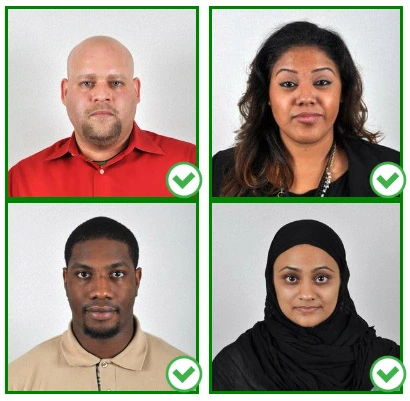
Face a bright window or the door when taking a photo. In this way, shadows can be avoided on the face and in the background. It is essential that the face is evenly lit. Ensure that the face is free of shadows and glares.
Note: You do not need to worry about the background, since our online passport photo generator will automatically do it for you.
Step 3: Dress appropriately for your passport photo
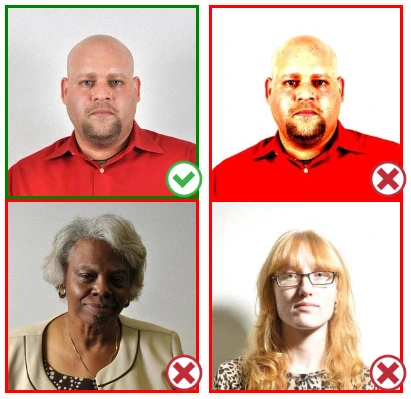
Uniforms should not be worn. Put on regular street clothes for your photo.
Eyeglasses should not be worn. You should remove any sunglasses, tinted glasses, or glasses that you wear if you are taking a passport photo.
Ensure that your face is fully visible. Make sure your hair doesn't cover your face or obscure your eyes. In the case of very long bangs covering your eyebrows, pin them back with bobby pins. Although it's better to show your ears as well, that won't stop your photo from being accepted.
Passport photos don't allow hats unless they're religious headgear such as a headscarf or yarmulke.
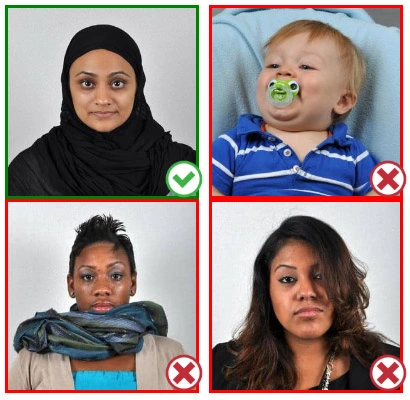
Step 4: Pose for a passport photo
Face the camera straight on and look straight at it. Avoid tilting or rotating the head.
It is important that the shoulders are visible, and there should be enough space around the head to crop the picture.
Make sure the camera is at the same level as the head.
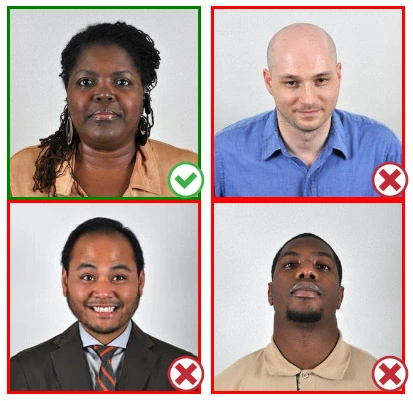
Step 5: Maintain neutral facial expressions
It's okay to smile in your passport photo, but the government prefers you to have a neutral facial expression.
Under the new international passport rules, it is usually not acceptable to smile or have your mouth open.
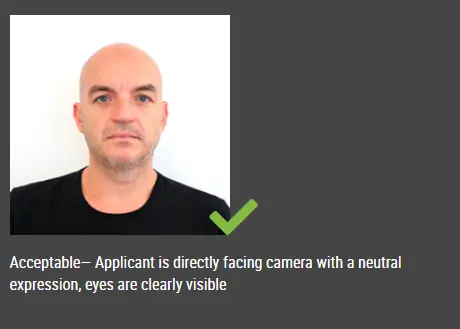
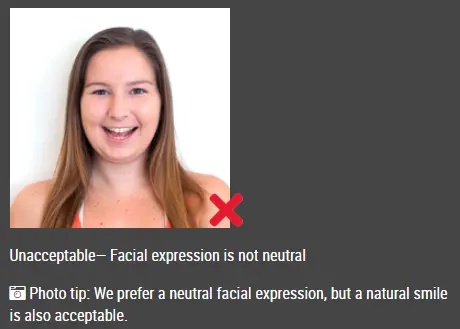
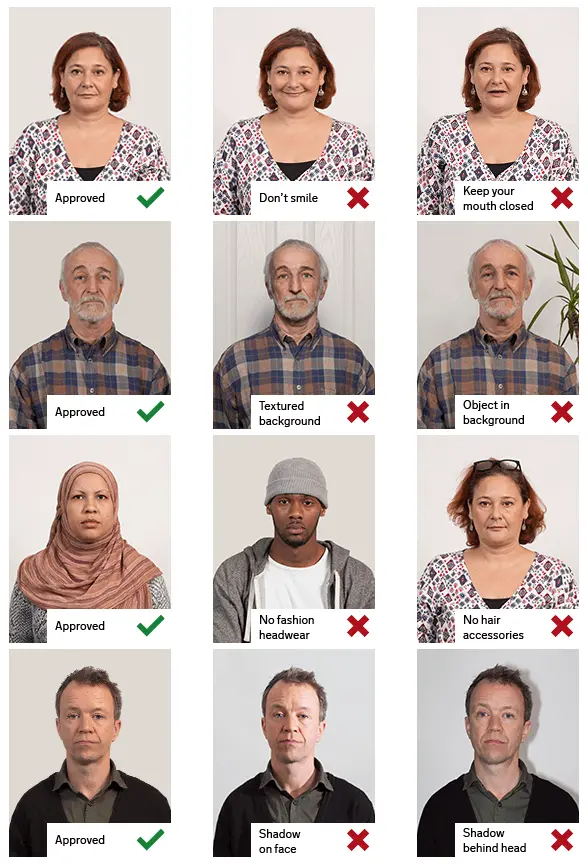
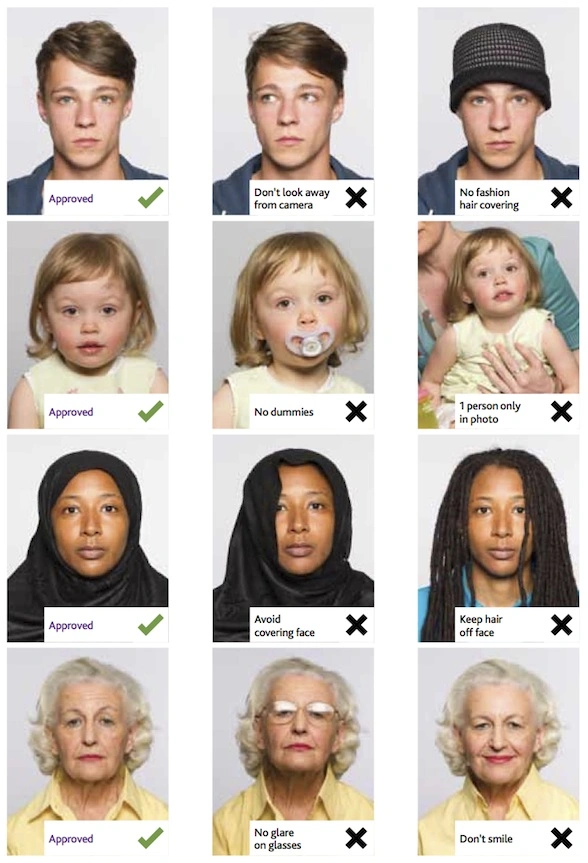
Good and bad examples of passport photos
This document is rated 5 / 5 - 61 Votes