Singapore ID Card Photo Size Requirements
| Passport picture size | Width: 35 mm, Height: 45 mm |
| Resolution (DPI) | 600 |
| Background color | White |
| Printable photo | Yes |
| Digital photo for online submission | Yes |
| Digital photo size | Width: 400 pixels , Height: 514 pixels |
| Photo Paper type | matte |
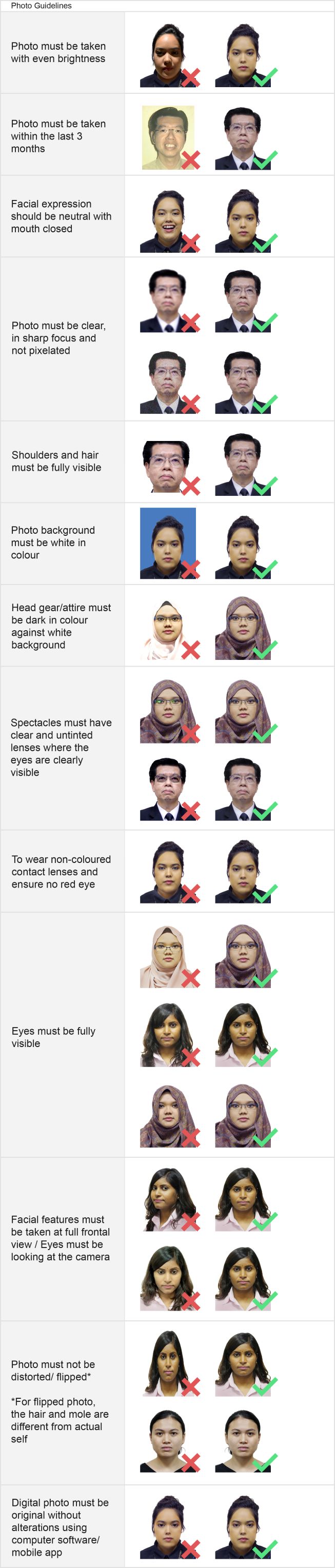
| Detailed requirements | Singapore IC / NRIC Photo Requirements – 35×45 mm & 400×514 pxA new photograph taken within 3 months must be submitted when applying for a new application. Printed photo
Digital photo
Both printed photo and digital photo must be the following requirements:
Can I Take a Singapore IC Photo With My Phone?Yes, you can take a Singapore IC or NRIC photo using a smartphone as long as the image meets the Immigration & Checkpoints Authority (ICA) requirements. To get a proper result that is suitable for submission, make sure the photo is taken carefully and follows the basic guidelines below:
If possible, ask someone else to take the photo for you. This usually produces a more accurate result than a selfie, since it is easier to maintain the correct angle, distance and framing. Make a Singapore IC / NRIC Photo Online with 123PassportPhoto.comPreparing your IC photo does not have to be complicated. Upload a recent photograph to 123PassportPhoto.com, our passport photo maker will crop it to the required Singapore IC photo dimensions and prepare a properly sized image for your application. For best results, start with a clear, high-resolution photograph taken straight in front of the camera against a plain background. Always review the latest application instructions provided by the Singapore Immigration & Checkpoints Authority (ICA) before submitting your photograph. |
Why 123PassportPhoto?
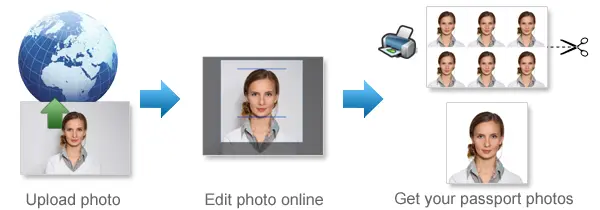
- Save money: You don't need to pay so much for your passport photo. With 123PassportPhoto service, you can make your own passport photos and print it yourself.
- Save time: Just take a photo using digital camera, then upload and create passport photo with 3 steps. It takes less than 5 minutes to be ready for download.
- White background enhancement: Our premium feature can help you to adjust the photo so that you can get a white background passport photo. Most countries prefer white background passport photos.
- Auto crop with face detection: Our system automatically detects your face and crops the photo to the correct passport size. You can still adjust the cropper manually to get the perfect result.
- Auto background removal: Automatically remove the background from your photo and replace it with the background color your document requires — white, blue or any other required color.
- Ultra high resolution photo: 123PassportPhoto generates passport photos suitable for 600 dpi printing.
- We support 50+ countries such as USA, UK, Ireland, Australia, Canada, France, Germany, Japan, South Africa, Brazil, China, Singapore, Russia, Hong Kong, Netherlands, Argentina and more.
General Passport Photo Requirements
- Neutral facial expression: a. do not open mouth; b. open eyes.
- No glasses; No Hat.
- Don't cover eyebrows with hair.
Find more information on requirements and photo taking tips here.
If you need to edit your photo, you can use our free photo editing tools.
How to Print Passport Photos Using Color Printer
- Download the 4R sheet with multiple photos.
- Check the requirements and use correct 4R photographic paper (matte, semi-matt or glossy paper).
- Print the 4R sheet with no margins. Make sure the 4R picture fit exactly on the 4R photo paper.
- Cut the 4R sheet along the gray lines and you will get multiple photos.
Steps to create passport photos
- Select country and ID photo type, and click Start.
- Upload photo. In order to correctly make passport photo, the picture size should be smaller than 10MB, and the dimensions should be smaller than 4000 x 3000 pixels. The system accepts only .JPG or .JPEG files. The Crop page opens when the photo is uploaded.
- Crop photo to the correct passport photo size dimension.
- If you need white background enhancement, select an enhancement.
- Click the Next button, you will get a printable passport picture which is suitable to be printed on 4R (4x6") photo paper.
- Save the 4R sheet and print it using a photo printer or print it at any photo center.
How to Take Baby Passport Photos
- Lay white or light color baby quilt or blanket in a bright room or other places with good lighting.
- Lay the baby on the quilt or blanket.
- Ensure baby is looking straight at the camera with eyes open, mouth closed and not smiling.
See more tips on taking baby passport photos here.
Passport Photo Size Requirements
- United States Passport Photos Size Requirements
- United Kingdom Passport Photsos Size Requirements
- Australia Passport Photos Size Requirements
Find passport photo requirements for more countries here.
Quick Links to Make Passport Photos
- Make US Passport Photos
- Make UK Passport Photos
- Make Australia Passport Photos
- Make EU Passport Photos
- Make Ireland Passport Photos
- Make Canada Passport Photos
- Make New Zealand Passport Photos
- Make China Passport Photos
- Make India Passport Photos
- Make Singapore Passport Photos
- US Passport Photos Near Me