US Walmart Passport Photos
Last Update: January 1, 2026
Passport photos are available at Walmart. Passport photos can be taken at Walmart Photo Centers or through the Walmart app. A passport photo can also be ordered online from Walmart's website, which will be printed and mailed to you or picked up in the nearest store after one hour.
Does Walmart do passport pictures?
Yes. Most Walmart locations have photo centers where you can get your passport photo taken.
How many passport photos does Walmart give?
You can get two passport photos for $7.44 at Walmart. By downloading the 4X6 template on our website and printing it at Walmart, you can get 6 passport photos for only 12 cents.
How do I order passport photos at Walmart online?
The Walmart Photo app allows customers to order prints of their digital photos and pick them up in-store or have them shipped to their homes. With the app, you can easily upload and print photos from your smartphone or tablet. Here are the steps you need to follow in order to print your photo.
-
It is available for free in the Apple App Store and Google Play Store, so make sure you download it first.
-
Open the app and sign in with your existing account or create a new one.
-
In the main menu, click "Photo Prints.".
-
In the app, you can select photos from your device's photo gallery or take new ones.
-
Select the print size and quantity for each photo.
-
You can place your prints in the cart and proceed to the checkout page.
-
Decide where the pickup will take place and how it will be shipped.
-
Enter your payment information and place your order
To place your order without downloading the app, you can use their website, the steps are similar.
Do you have to pay again if passport photo is rejected?
If your photo is rejected, you have 90 days to replace it with a perfect one that meets all passport photo guidelines. You'll have to apply for passport renewal and pay the fee again if you don't take any action within 90 days.
Can I take US passport photo by myself?
Sure, but please do not take a selfie and have someone else take it for you.
What format do photos need to be in to print at Walmart?
JPEG is usually the format Walmart uses to print photos. Images can be a maximum of 8000 pixels wide, 8000 pixels high, and 16 megabytes in size.
How can I convert my photo to passport size?
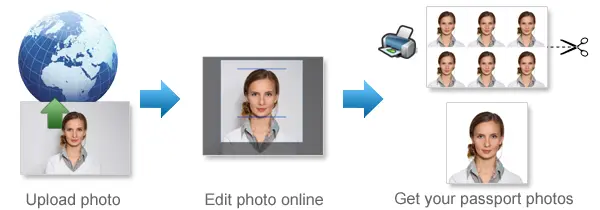
Just upload your photo to our website www.123passportphoto.com, we will convert your photo into the right passport photo size within seconds.
Can you smile in passport photo?
Yes, but facial expressions should be neutral and teeth should not be visible.
Where can I get a digital passport photo in the US?
We offer the simplest and fastest method of obtaining your digital passport photo, by taking your passport photo with your smart phone and uploading it to our website. Our website will remove the background and produce your passport photo in the correct size and format.
What are the photo requirements for a US passport?
-
The photo must be high resolution and not blurry, grainy, or pixelated.
-
Passport photos should be the following size:
-
2 x 2 inches (51 x 51 mm)
-
Head must be between 1 -1 3/8 inches (25 - 35 mm) from the bottom of the chin to the top of the head
-
-
Printed on glossy or matte photo paper.
-
The photo should not be digitally altered.
-
A damaged photo with holes, creases, or smudges cannot be submitted.
-
Maintain a neutral facial expression with closed eyes and an open mouth.
-
Make sure you are facing the camera directly with your full face visible.
-
You cannot wear glasses.
-
If you cannot remove your glasses for medical reasons, please include a signed note from your doctor with your application.
-
-
Taken in clothing normally worn on a daily basis.
-
Camouflage clothing, uniforms, or clothing that looks like uniforms are not allowed.
-
Hats and headcovers are not allowed.
-
If you wear a hat or head covering for religious purposes, submit a signed statement that verifies that the hat or head covering in your photo is part of traditional religious attire worn continuously in public.
-
If you wear a hat or head covering for medical purposes, submit a signed doctor's statement verifying the hat or head covering in your photo is used daily for medical purposes.
-
Hats and head coverings cannot cast shadows or cover up part of your face. Your full face must be visible.
-
-
Hands-free devices and headphones are not allowed.
-
Jewellery and facial piercings can be worn as long as they don't conceal your face. Permanent tattoos are acceptable for passport purposes as well.
| 1 | 2 |
| 3 | 4 |