
Best Passport Photo Apps: Try 123PassportPhoto.com Online
Last Update: June 12, 2026
Passport photos are never as simple as they should be.
You would think taking a tiny picture of your face would be easy. Stand still, look at the camera, done. But no. Passport photos come with rules. So many rules. Your head has to be the right size, your background has to be plain, your expression has to be neutral, and somehow you have to look like yourself without looking too happy about it.
And if you have ever used a photo booth, you already know the pressure. The countdown starts, you panic, your face freezes, and suddenly you are stuck with a photo that makes you look like you were surprised by bad news.
That is why passport photo apps and online passport photo tools are actually useful. They take one of the most boring parts of travel preparation and make it a lot easier.
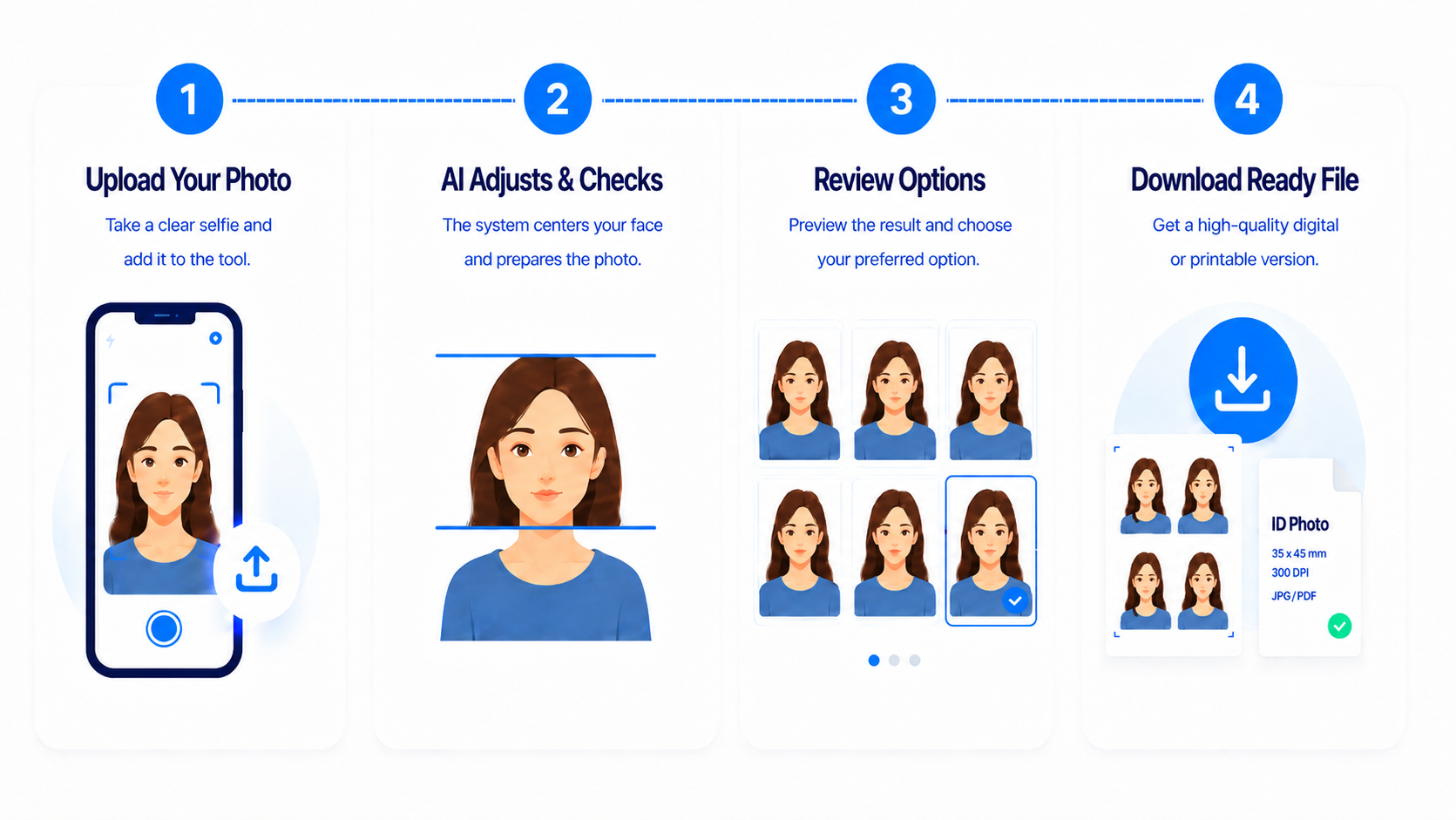
Among the best passport photo apps and online tools, 123PassportPhoto.com is worth trying because it keeps the process simple: upload a photo, crop it, adjust it, and get a passport-style image without going to a studio or downloading complicated software.
Why Passport Photo Apps Are Useful
Passport photos look simple, but the requirements can be annoyingly specific. Different countries have different photo sizes. Some documents need different formats. Even the position of your face in the frame matters.
A good passport photo app should help with those details instead of leaving you to guess. It should let you choose the country or document type, crop the image correctly, and prepare the photo for printing or download.
No dramatic editing tools. No confusing design dashboard. Just the basics.
What 123PassportPhoto.com Does
123PassportPhoto.com is an online passport photo maker that works directly in your browser. The service has been helping users create passport photos since 2008, which gives it a long track record in the online passport photo space.
It also reports a 99.8% acceptance rate, making it a reassuring choice for users who want to prepare document photos with fewer worries. You still need to follow the official photo rules for your country or document type, but the tool is designed to help make the process much easier.
You can use it as a basic passport photo editor when you need to prepare a document photo quickly. Select your country and document type, upload a photo, adjust the crop, and download the final image. It works for passport photos, visa photos, and other ID-style pictures.
For anyone searching for a passport size photo maker, the website helps turn a regular picture into the right document-photo format. And if you are dealing with visa paperwork, it can also work as a visa photo maker online, which is useful when you do not want to visit a photo shop just for one small picture.
This is especially helpful if you already have a decent photo and only need to make it the right size. Instead of going somewhere to get the photo taken, you can prepare it yourself at home.
The AI Face Detection Helps
One feature that makes 123PassportPhoto.com easier to use is its AI face detection.
After you upload your photo, the tool can detect your face and place the crop frame around it. That saves you from guessing where your head should sit in the photo.
This is useful because passport photos are weirdly precise. Your face cannot be too big, too small, too high, or too low. The AI detection gives you a good starting point.
You Can Still Adjust the Crop Yourself
The nice thing is that you are not stuck with whatever the tool chooses automatically.
123PassportPhoto.com also works as a passport photo cropper, because it lets you move and adjust the crop box yourself. So if the AI gets close but not perfect, you can fine-tune it. You can shift the frame slightly, resize the crop area, and make sure the photo looks properly centered before downloading it.
That combination makes the tool feel more practical. The AI does the boring part first, and then you still get control over the final result.
It Can Save Money
Passport photos can be surprisingly expensive for something so small. If you are applying for more than one document, or if several people in your family need photos, the cost adds up quickly.
Using a passport photo online tool like 123PassportPhoto.com can be a cheaper alternative. You prepare the photo yourself and then print it at home or at a local photo shop.
It is not the most glamorous travel hack, but it is the kind of small saving that feels satisfying.
It Is Useful When You Are in a Hurry
Another reason online passport photo makers are helpful: timing.
Travel paperwork always seems to become urgent at the worst possible moment. Maybe your visa application needs a photo. Maybe your passport renewal is due. Maybe you suddenly realize the photo you have is the wrong size.
Instead of searching for a nearby photo booth or waiting for a shop to open, you can use 123PassportPhoto.com from your browser. If you already have a suitable photo, the whole process is much easier.
A Few Tips Before You Upload Your Photo
Start with a good original picture. That makes everything easier.
Stand facing the camera. Keep your expression neutral. Avoid strong shadows. Do not tilt your head. Do not use a dramatic selfie angle, even if it is your best angle.
Passport photos are not trying to capture your personality. They are just trying to prove that your face matches your documents.
Final Thoughts
Passport photos are one of those small travel tasks that somehow become more annoying than expected. The rules are strict, the photos are rarely flattering, and the process often feels more complicated than it needs to be.
That is why tools like 123PassportPhoto.com are useful. It gives you a simple way to create passport, visa, and ID photos online without making the process feel complicated.
The AI face detection helps position your face, and the manual crop adjustment lets you fine-tune the result yourself.
It is simple, practical, and much less stressful than trying to look normal in a photo booth with three seconds on the clock.