United States NY MTA Metrocard for Seniors (1.5x2 inch) Photo Size Requirements and Online Tool
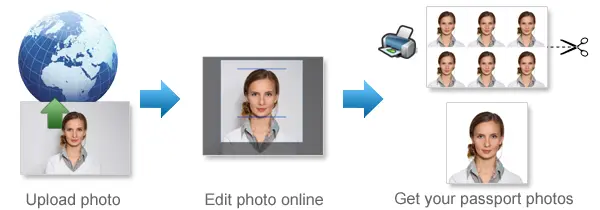
Make United States NY MTA Metrocard for Seniors Photos Online Now »
| Passport picture size | Width: 1.5 inch, Height: 2 inch |
| Resolution (DPI) | 600 |
| Background color | White |
| Printable photo | Yes |
| Digital photo for online submission | Yes |
| Digital photo size | Width: 1000 pixels , Height: 1000 pixels |
| Photo Paper type | matte |
Do not worry about the photo size requirements. Our online tool makes correct photos, ensuring the photo size and head size are correct. Background will be enhanced as well.
Last Update: July 31, 2026
MTA Reduced-Fare OMNY Photo Requirements for Seniors
If you are applying for an MTA Reduced-Fare OMNY card by mail, you will need to include a recent passport-style photograph with your application.
The required photo size is 1.5 inches wide by 2 inches tall. Your picture should show a clear, front-facing view of your face against a plain, solid background.
The Reduced-Fare OMNY card is replacing the Senior Reduced-Fare MetroCard. Although many riders still refer to it as a Senior MetroCard, new applicants are generally issued an OMNY card after approval.
You can use our photo tool to crop your image to the correct size and prepare it for printing.
CREATE AN MTA REDUCED-FARE PHOTO
MTA Reduced-Fare Photo Size and Specifications
Your printed photograph should meet these basic requirements:
Photo dimensions: 1.5 inches wide × 2 inches tall
Metric dimensions: Approximately 38 mm wide × 51 mm tall
Orientation: Portrait
Photo style: Recent passport-style photograph
Pose: Face the camera directly
Background: Plain and solid
Image quality: Clear, sharp, and evenly lit
Name on photo: Write your full name on the back
Required for: Applications submitted by mail
Your face should be centered and easy to recognize. Avoid blurry images, heavy filters, strong shadows, distracting backgrounds, or edits that noticeably change your appearance.
How to Apply for an MTA Reduced-Fare OMNY Card
People aged 65 and older can apply for the MTA Reduced-Fare program. Applications may be submitted by mail or completed in person at an eligible MTA location.
Applying by Mail
To apply by mail:
-
Complete the official MTA Reduced-Fare application form.
-
Include a recent photograph measuring 1.5 × 2 inches.
-
Write your full name on the back of the photo.
-
Provide a copy of an accepted document showing proof of age.
-
Send the completed application to the address listed on the current MTA form.
Review the latest official application before mailing anything. Addresses, accepted documents, and application procedures may change.
Applying in Person
You can also apply at a participating MTA customer service location or mobile sales location.
Applicants who apply in person may have their photo taken free of charge, so bringing a printed photograph may not be necessary.
Before visiting, check the official MTA website for current locations, opening hours, identification requirements, and service availability.
Who Can Apply for a Senior Reduced-Fare Card?
The senior Reduced-Fare program is available to riders who are 65 years of age or older.
You will need to provide an accepted form of identification or another document that confirms your age. Depending on the current application rules, accepted documents may include a driver’s license, state-issued identification card, passport, birth certificate, Medicare card, or similar official record.
Refer to the latest MTA application for the complete list of accepted documents.
Senior MetroCard or Reduced-Fare OMNY Card?
The MTA is moving Reduced-Fare riders from MetroCard to OMNY.
For that reason, the card may now be described as a Reduced-Fare OMNY card rather than a Senior MetroCard. The older name is still widely used, particularly by existing riders and people searching for application instructions.
Whether you search for a Senior MetroCard photo or an OMNY Reduced-Fare photo, the application photograph serves the same basic purpose: identifying the approved cardholder.
Frequently Asked Questions
What size photo is required for an MTA Reduced-Fare application?
The required printed photo measures 1.5 inches wide by 2 inches tall. This is approximately 38 mm wide by 51 mm tall.
Does the photo need a white background?
The background should be plain and solid. A white or light-colored wall is often the easiest option because it provides a clear contrast with your face and clothing.
Can I use a regular passport photo?
A standard United States passport photo measures 2 × 2 inches, which is wider than the MTA photo requirement.
You may be able to use the same original image, but it should be cropped and printed at 1.5 × 2 inches for the MTA application.
Can I take the picture with my phone?
Yes. A phone photo is usually suitable as long as it is recent, clear, properly lit, and taken from directly in front of you.
Can I smile?
A natural expression or slight smile should be acceptable as long as your face remains clearly visible. Avoid exaggerated facial expressions.
Are glasses allowed?
Glasses can be worn if they do not create reflections or block your eyes. Check the image carefully before printing to make sure your facial features are easy to see.
Can I wear a hat or head covering?
Avoid hats and other coverings that hide part of your face. Religious or medical head coverings should leave your facial features visible.
Should I write my name on the photo?
Yes. For a mailed application, write your full name on the back of the printed photograph.
Can I submit the photo online?
At the time this information was reviewed, online Reduced-Fare applications were not available. Applications could be submitted by mail or completed in person.
Because MTA services may change, check the official website before starting your application.
Do I need to bring a photo when applying in person?
The MTA offers free photography at participating in-person application locations. Confirm that this service is available at your chosen location before visiting.
How long does approval take?
Processing times depend on the application method and current demand. Applications sent by mail may take longer than applications completed in person.
Check the latest MTA guidance for current processing estimates.
How to Prepare Your MTA Photo with 123passportphoto.com passport size photo tool
Follow these steps to create a photo for your mailed application:
-
Take a recent, front-facing picture.
-
Upload the image to our photo tool.
-
Crop it to 1.5 inches wide by 2 inches tall.
-
Download the prepared photo.
-
Print it on good-quality photo paper.
-
Cut carefully around the edges.
-
Write your full name on the back.
-
Attach it to your completed application.
Official Sources
- MTA Reduced-Fare Program Information
- MTA Reduced-Fare Application for People 65 and Older
- MTA Reduced-Fare OMNY Information
- MTA Customer Service Centers
- MTA Mobile Sales Locations
- U.S. Department of State Passport Photo Requirements
If you want to make passport/visa photos for other countries, click the button below.
Make Passport/Visa Photo for Other Countries
How to make United States NY MTA Metrocard for Seniors photo online
Step 1: Take a picture with a digital camera or a smartphone
Make sure someone takes your passport photo for you. Selfies are not accepted. Make use of your tripod if you have one. By using a tripod, you will be able to keep the camera level and steady. Ideally, the person should be around 1 meter away from the camera.
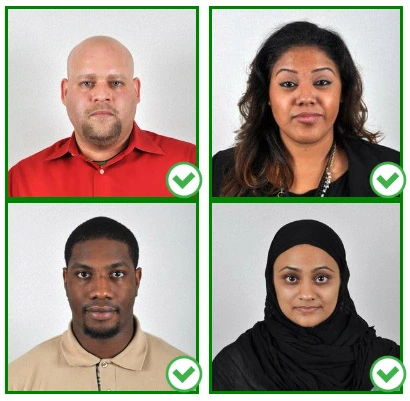
Step 2: Choose a venue with appropriate lighting
Face a bright window or the door when taking a photo. In this way, shadows can be avoided on the face and in the background. It is essential that the face is evenly lit. Ensure that the face is free of shadows and glares.
Note: You do not need to worry about the background, since our online passport photo generator will automatically do it for you.
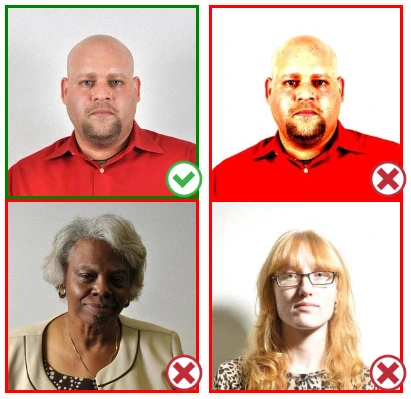
Step 3: Dress appropriately for your passport photo
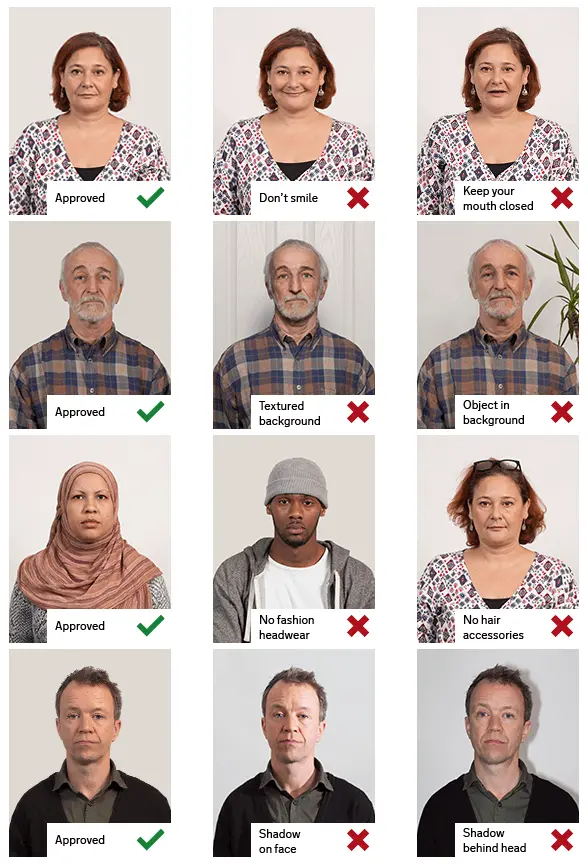
Uniforms should not be worn. Put on regular street clothes for your photo.
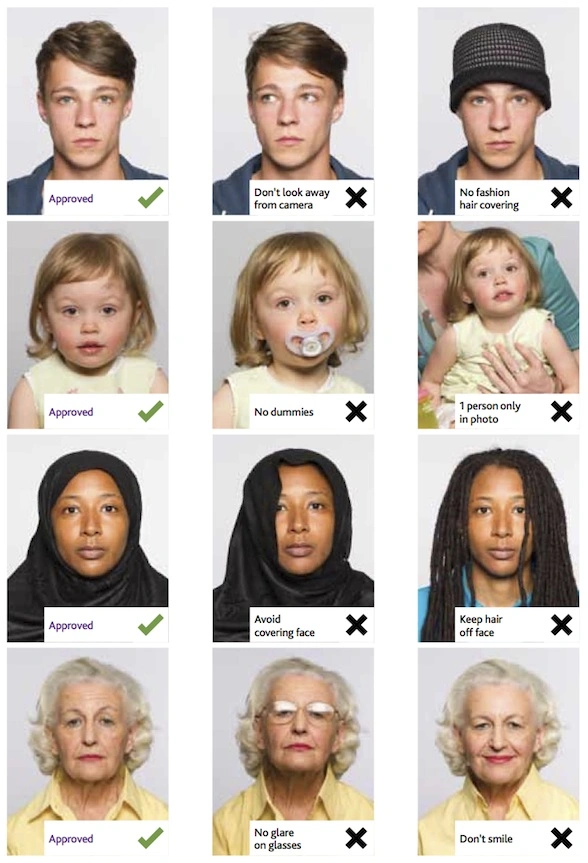
Eyeglasses should not be worn. You should remove any sunglasses, tinted glasses, or glasses that you wear if you are taking a passport photo.
Ensure that your face is fully visible. Make sure your hair doesn't cover your face or obscure your eyes. In the case of very long bangs covering your eyebrows, pin them back with bobby pins. Although it's better to show your ears as well, that won't stop your photo from being accepted.
Passport photos don't allow hats unless they're religious headgear such as a headscarf or yarmulke.
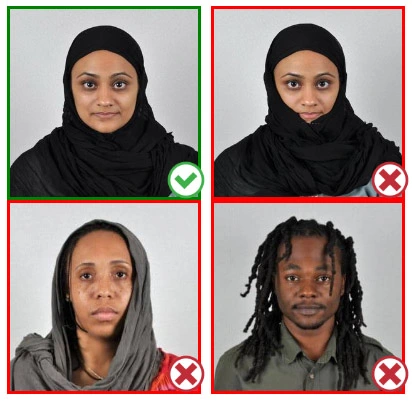
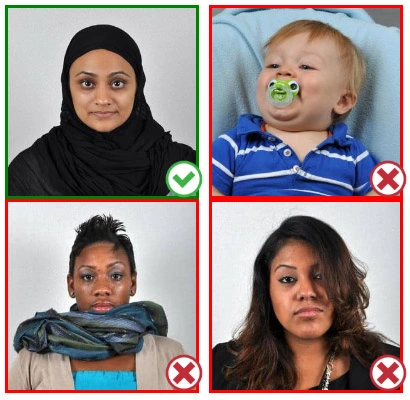
Step 4: Pose for a passport photo
Face the camera straight on and look straight at it. Avoid tilting or rotating the head.
It is important that the shoulders are visible, and there should be enough space around the head to crop the picture.
Make sure the camera is at the same level as the head.
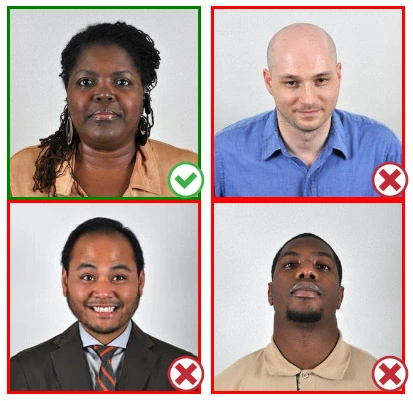
Step 5: Maintain neutral facial expressions
The government prefers you to have a neutral facial expression.
Under the new international passport rules, it is usually not acceptable to smile or have your mouth open.
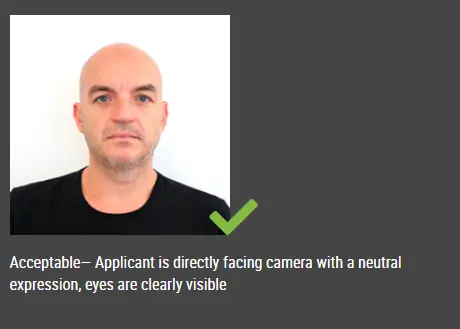
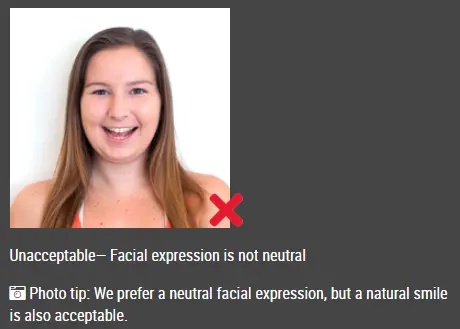
Good and bad examples of passport photos
Make United States NY MTA Metrocard for Seniors Photo Online Now »