United States NY Gun License (1.5x1.5 inch) Photo Size Requirements and Online Tool
Make United States NY Gun License Photos Online Now »
| Passport picture size | Width: 1.5 inch, Height: 1.5 inch |
| Resolution (DPI) | 600 |
| Background color | White |
| Printable photo | Yes |
| Digital photo for online submission | Yes |
| Digital photo size | Width: 1000 pixels , Height: 1000 pixels |
| Photo Paper type | matte |
Do not worry about the photo size requirements. Our online tool makes correct photos, ensuring the photo size and head size are correct. Background will be enhanced as well.
Last Update: July 30, 2026
New York Pistol Permit Photo Requirements
Create a properly sized photo for your New York pistol permit, handgun license or firearm license application.
New York photo requirements can vary depending on the licensing authority processing your application. New York City applicants may receive different instructions from applicants applying through a county licensing office.
Always check the current application form or instructions issued by your local licensing authority before submitting your photo.
Quick Photo Requirements
Your New York pistol permit photo should generally be:
-
A recent color photograph
-
A clear, full-face image
-
Taken against a plain, light-colored background
-
Sharp, evenly lit and in focus
-
Free from shadows across the face or background
-
Taken without anything covering your facial features
-
Printed or uploaded in the size requested by your licensing authority
The New York State pistol and firearm license application requires a full-face photograph taken within the previous 30 days.
What Size Is a New York Pistol Permit Photo?
There is no single photo size that applies to every New York licensing authority.
Depending on where you apply, you may be asked to provide:
-
A 1.5 × 1.5-inch photograph
-
A standard 2 × 2-inch passport photograph
-
A passport-size digital photograph
-
One or more printed copies
-
A digital image uploaded through an online licensing portal
Follow the dimensions shown on your current application form. Do not assume that requirements from another New York county or New York City will apply to your application.
New York City Handgun License Photo
New York City handgun and firearm license applications are handled by the NYPD License Division.
Applicants are generally asked to provide a recent passport-style photograph. Your face should be clearly visible, and the image should accurately represent your current appearance.
Current NYPD instructions may restrict hats and glasses, except where an item is worn for religious reasons.
Because application procedures can change, review the photo instructions in the NYPD licensing portal before uploading or printing your image.
New York County Pistol Permit Photo
Outside New York City, pistol permit applications are generally processed by a county or local licensing authority.
Each authority may set its own requirements for:
-
Photo dimensions
-
Number of copies
-
Printed or digital format
-
File type
-
File size
-
Background color
-
Photo recency
Some counties request standard 2 × 2-inch passport photos, while other application packets may specify a different size.
Check your county’s current pistol permit application packet before creating your final photo.
What to Wear
Wear normal everyday clothing that contrasts with the background.
Avoid:
-
White clothing against a white background
-
Uniforms, unless normally worn for religious reasons
-
Large accessories that cover the neck or face
-
Hats or fashion head coverings
-
Tinted glasses
Your clothing should not blend into the background or interfere with the outline of your head and shoulders.
Printed Photo Requirements
When printing your photo:
-
Use good-quality photo paper
-
Select the exact dimensions requested by your licensing authority
-
Disable automatic cropping when possible
-
Do not stretch or distort the image
-
Make sure your head is not cut off
-
Print at the original scale
-
Cut carefully along the photo borders
Before printing multiple copies, measure the first printed photo with a ruler to confirm its dimensions.
Printer settings can automatically enlarge or reduce an image. Select “actual size,” “100% scale” or the equivalent option when available.
Digital Photo Requirements
For an online application, check the licensing portal for:
-
Accepted file types, such as JPEG or PNG
-
Maximum file size
-
Minimum image dimensions
-
Required aspect ratio
-
Background requirements
-
Upload instructions
Do not submit a screenshot of a printed photo. Use the original digital image whenever possible.
Avoid social media filters, portrait effects, artificial backgrounds and heavy photo editing.
Basic cropping, resizing and background correction may be used, provided the final image still accurately represents your appearance.
Create Your New York Pistol Permit Photo
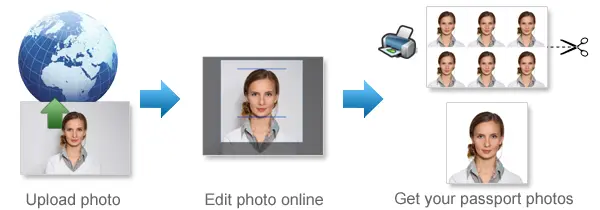
Use 123passportphoto.com to crop and resize your photo for your application with 4 simple steps:
-
Select country/region and photo type
-
Upload your photo
-
Process your photo
-
Download the image for printing or digital submission.
Photo Submission Checklist
Before submitting your photo, confirm that:
-
The photo was taken recently
-
Your full face is clearly visible
-
You are looking directly at the camera
-
The image is sharp and in focus
-
The lighting is even
-
There are no strong shadows
-
The background is plain
-
Nothing covers your facial features
-
The dimensions match your application
-
You have the correct number of copies
-
The digital file meets the upload requirements
-
You followed instructions from your own licensing authority
Common Reasons a Photo May Be Rejected
A photo may be rejected when:
-
The wrong dimensions are used
-
The image is too old
-
The photograph is blurry or pixelated
-
The face is too small or too large
-
Part of the head is cropped out
-
The applicant is not facing the camera
-
Shadows cover the face
-
The background is distracting
-
Glasses create glare
-
A hat or accessory obscures the face
-
The image has been heavily edited
-
The file does not meet the portal’s technical requirements
-
Requirements from the wrong county were followed
Frequently Asked Questions
What is the required size for a New York pistol permit photo?
The required size depends on the licensing authority. Some instructions use a 1.5 × 1.5-inch photograph, while some counties request a standard 2 × 2-inch passport photo. Online applications may ask for a passport-size digital image.
Check your current application instructions before creating the photo.
Does my photo have to be taken within 30 days?
The New York State pistol and firearm license application states that the full-face photograph must have been taken within the previous 30 days.
Your local authority may provide additional instructions.
Can I use a standard passport photo?
A standard passport photo may be accepted when the licensing authority requests a passport-size or 2 × 2-inch photograph.
Do not use a standard passport photo when your application specifies a different size.
Can I take the photo with my phone?
Yes. A modern smartphone can produce a suitable image when the photo is sharp, evenly lit and taken against a plain background.
Use the rear camera when possible and ask another person to take the photo. This usually produces better framing than a close-up selfie.
Can I wear glasses?
Requirements may vary. Current New York City instructions may prohibit glasses in the submitted photograph.
To reduce the risk of rejection, remove glasses unless your licensing authority specifically allows them.
Can I smile in the photo?
Use a natural or neutral expression. Avoid exaggerated smiles or expressions that change your normal facial appearance.
Do I need a printed photo or a digital file?
This depends on how and where you apply.
Paper application packets may require printed photographs. Online licensing portals may require a digital upload. Some authorities may require both.
How many copies do I need?
The number of copies varies by licensing authority. Check the current checklist included with your application packet.
Are the requirements the same across New York State?
No. New York City and individual county licensing authorities may use different photo dimensions and submission procedures.
Always follow the instructions issued by the authority processing your application.
If you want to make passport/visa photos for other countries, click the button below.
Make Passport/Visa Photo for Other Countries
How to make United States NY Gun License photo online
Step 1: Take a picture with a digital camera or a smartphone
Make sure someone takes your passport photo for you. Selfies are not accepted. Make use of your tripod if you have one. By using a tripod, you will be able to keep the camera level and steady. Ideally, the person should be around 1 meter away from the camera.
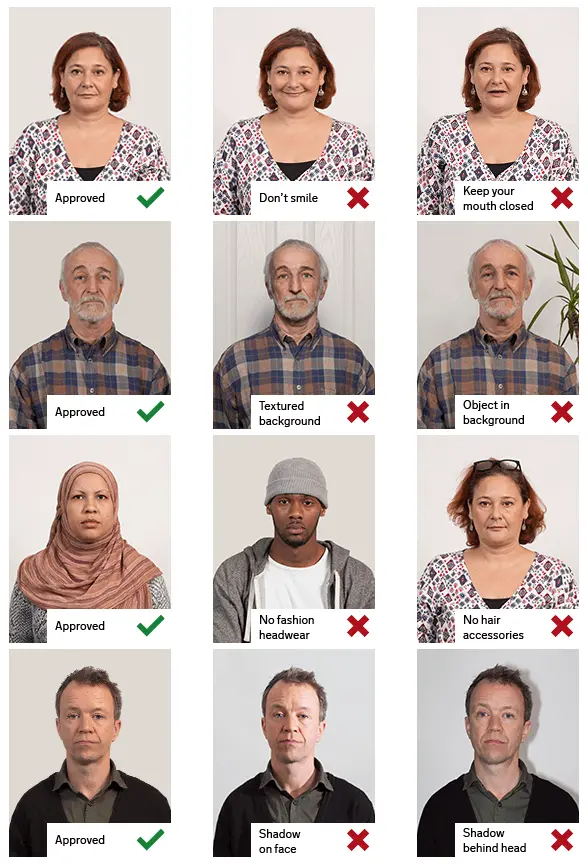
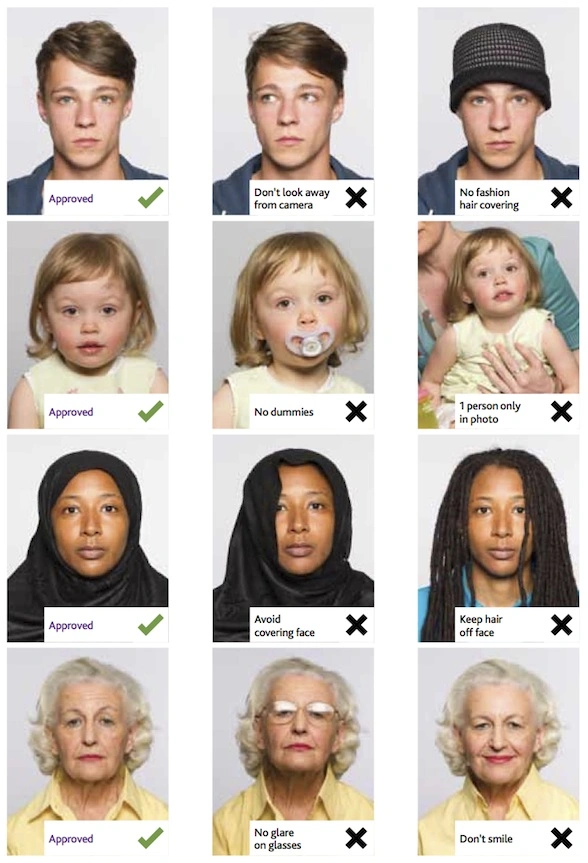
Step 2: Choose a venue with appropriate lighting
Face a bright window or the door when taking a photo. In this way, shadows can be avoided on the face and in the background. It is essential that the face is evenly lit. Ensure that the face is free of shadows and glares.
Note: You do not need to worry about the background, since our online passport photo generator will automatically do it for you.
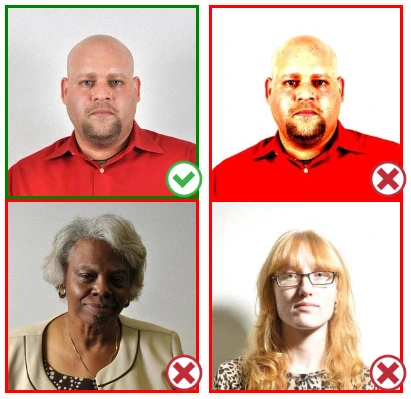
Step 3: Dress appropriately for your passport photo
Uniforms should not be worn. Put on regular street clothes for your photo.
Eyeglasses should not be worn. You should remove any sunglasses, tinted glasses, or glasses that you wear if you are taking a passport photo.
Ensure that your face is fully visible. Make sure your hair doesn't cover your face or obscure your eyes. In the case of very long bangs covering your eyebrows, pin them back with bobby pins. Although it's better to show your ears as well, that won't stop your photo from being accepted.
Passport photos don't allow hats unless they're religious headgear such as a headscarf or yarmulke.
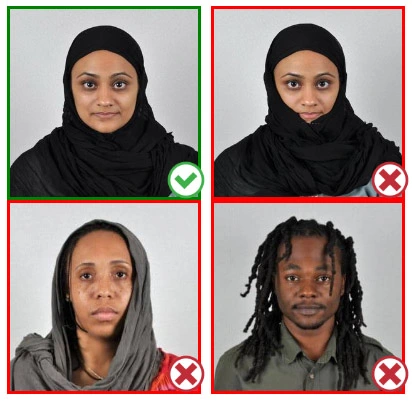
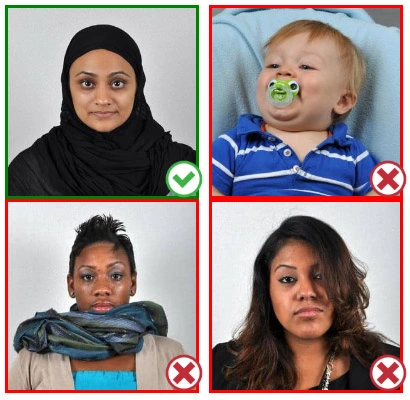
Step 4: Pose for a passport photo
Face the camera straight on and look straight at it. Avoid tilting or rotating the head.
It is important that the shoulders are visible, and there should be enough space around the head to crop the picture.
Make sure the camera is at the same level as the head.
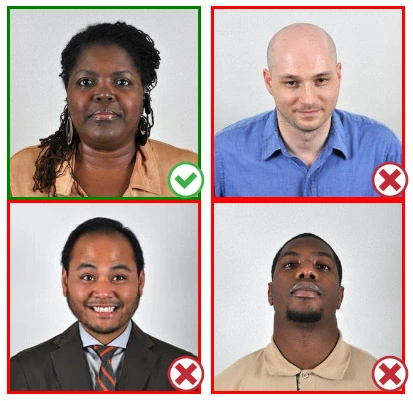
Step 5: Maintain neutral facial expressions
The government prefers you to have a neutral facial expression.
Under the new international passport rules, it is usually not acceptable to smile or have your mouth open.
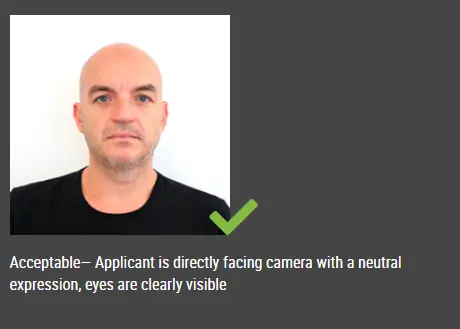
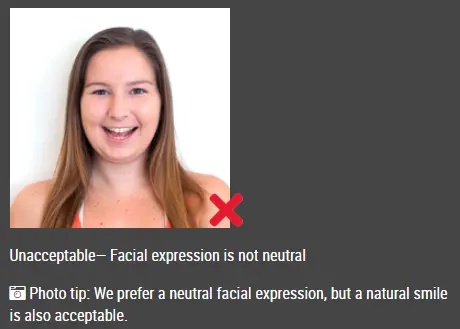
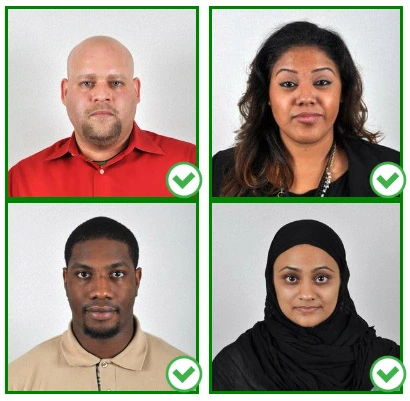
Good and bad examples of passport photos