United States Green card (2x2 inch) Photo Size Requirements and Online Tool
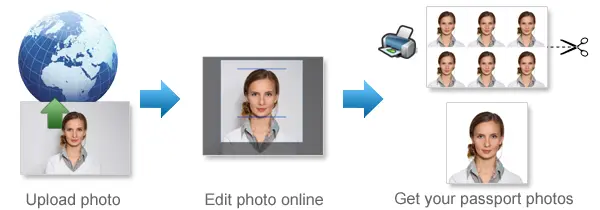
Make United States Green card Photos Online Now »
| Passport picture size | Width: 2 inch, Height: 2 inch |
| Resolution (DPI) | 600 |
| Background color | White |
| Printable photo | Yes |
| Digital photo for online submission | Yes |
| Digital photo size | Width: 1000 pixels , Height: 1000 pixels |
| Photo Paper type | matte |
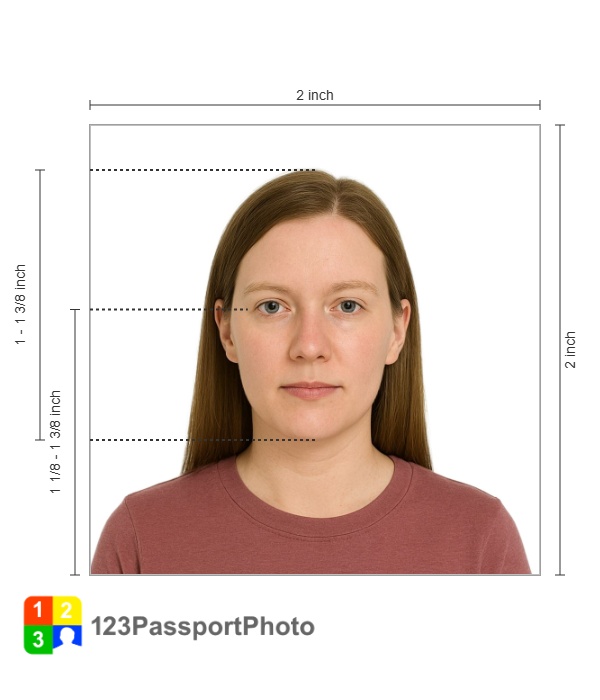
Do not worry about the photo size requirements. Our online tool makes correct photos, ensuring the photo size and head size are correct. Background will be enhanced as well.
Last Update: July 30, 2026
United States Green card general requirements
Your photo is a vital part of your Green Card application. The photo must meet all the requirements, such as size, background color and clarity. This ensures that the immigration officials can clearly identify the person in the photo and verify that the photo is a true representation of the applicant.
The image file must adhere to the following compositional and technical specifications and can be produced in one of the following ways: taking a new digital image or using a digital scanner to scan a photograph.
Image Acquisition
- The image file may be produced by acquiring an image with a digital camera or by digitizing a paper photograph with a scanner.
- Digital enhancement or other alterations or retouching are not permitted.
- The original aspect ratio of the image must be preserved. (No image stretching is allowed.)
Compositional Specifications:
The submitted photo or digital image must conform to the following compositional specifications or the entry will be disqualified.
Content
- The image must contain the full face, neck, and shoulders of the entrant
- Directly facing the camera in full-face view
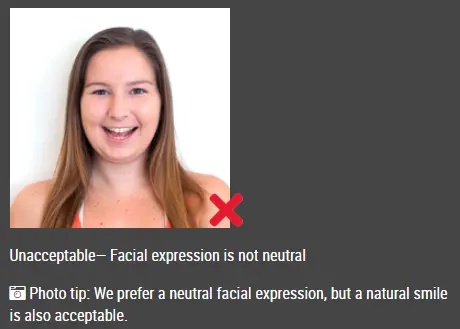
- Open both eyes and maintain a neutral facial expression
- The image must not contain any parts of the body below the entrant's shoulders.
- The image must not include other objects or additional people.
- The entrant must be vertically oriented in the image.
- Photographed within the last six months to reflect your current appearance
Head Position
- The person being photographed must directly face the camera.
- The head of the person should not be tilted up, down, or to the side.
- Head height is between 1 inch and 1 3/8 inches (22 mm and 35 mm), or 50% and 69% of the image's total height from the bottom of the chin to the top of the head.
Background
-
a plainwhite or off-white background, dark or patterned backgrounds are not acceptable.
-
The person being photographed should be taken with the person in front of a neutral, light-colored background.
Focus/Resolution
- The photograph must be in focus.
- The entire face must be in focus.
- Fine facial features must be clearly recognizable.
- Pixels or dot patterns must not be perceptible.
Dress
-
Dressed in your daily clothing
-
Uniforms should not be worn in your photo, except religious clothing that is worn daily
Decorative Items
- In new visa photos, eyeglasses are not allowed except when they cannot be removed for medical reasons; for example, if the applicant has recently had ocular surgery and the eyeglasses are needed to protect their eyes.In these cases, a medical professional's or health practitioner's signature is needed.In case the eyeglasses are accepted for medical reasons:
- The frames of the eyeglasses must not cover the eye(s).
- There must not be glare on eyeglasses that obscures the eye(s).
- There must be no shadows or refraction from the eyeglasses that obscurethe eye(s).
- You may be wearing a hearing device or other similar articles in your photo if you normally wear them.
Head Coverings and Hats
- You should not wear a hat or head covering obscuring your hair or hairline unless it is for a religious purpose. There must be no shadows cast on your face by your head covering, and your full face must be visible.
Color photographs in 24-bit color depth are required
Color photographs may be downloaded from a camera to a file in the computer or they may be scanned onto a computer. If you are using a scanner, the settings must be for True Color or 24-bit color mode. See the additional scanning requirements below.
Technical Specifications
The submitted digital photograph must conform to the following specifications or the system will automatically reject the E-DV entry form and notify the sender.
Taking a New Digital Image
If a new digital image is taken, it must meet the following specifications:
|
Image File Format:
|
JPEG - the image must be in the Joint Photographic Experts Group format. |
|
Image File Size:
|
240 kilobytes (240 KB) is the maximum image file size. |
|
Image Resolution and Dimensions:
|
Minimum acceptable dimensions are 600 x 600 pixels. Maximum acceptable dimensions are 1200 x 1200 pixels. Image pixel dimensions must be in a square aspect ratio (meaning the height must be equal to the width). |
|
Compression |
For the image to be under the maximum file size, it may need to be compressed. The compression ratio should be less than or equal to 20:1. |
|
Image Color Depth: |
It must be in color (24 bits per pixel) and in sRGB color space, which is the common output of most digital cameras. [24-bit black and white or 8-bit images will NOT be accepted]. |
Scanning a Submitted Photograph
Before a photographic print is scanned, it must meet the compositional specifications listed above. If the photographic print meets the print color and compositional specifications, scan the print using the following scanner specifications:
|
Scanner Resolution:
|
Scanned at a resolution of 300 pixels per inch (12 pixels per millimeter) |
|
Image File Format:
|
The image must be in JPEG file format. |
|
Image File Size:
|
The maximum image file size is 240 kilobytes (240 KB). |
|
Image Resolution:
|
Minimum acceptable dimensions are 600 x 600 pixels. Maximum acceptable dimensions are 1200 x 1200 pixels. Image pixel dimensions must be in a square aspect ratio (meaning the height must be equal to the width). |
|
Image Color Depth:
|
[Note that black and white, monochrome, or grayscale images will NOT be accepted.] |
Copies or digital scans of driver's licenses or other official documents are not acceptable.
Which Green Card Photo Do You Need?
1. Form I-485 Green Card Photo Requirements
Form I-485 is used by eligible applicants who are applying to register permanent residence or adjust status from inside the United States.
USCIS instructions generally require applicants to submit two identical, recent, color passport-style photographs.
The photographs should be:
- 2 × 2 inches
- Printed in color
- Printed on thin paper with a glossy finish
- Unmounted
- Unretouched
- Taken against a white or off-white background
- A full-face, front-facing view
Your head should measure between 1 inch and 1⅜ inches from the top of your hair to the bottom of your chin.
USCIS instructions also direct applicants to lightly write their name and A-Number, when applicable, on the back of each photograph using a pencil or felt-tip pen.
Always review the latest edition of the Form I-485 instructions before submitting your application. Requirements can change, and some applicants may receive separate biometrics or photograph instructions from USCIS.
2. Immigrant Visa Photo Requirements
Applicants completing Form DS-260 through consular processing must bring two identical printed photographs to their immigrant visa interview.
Each photograph must be:
- 2 × 2 inches
- 51 × 51 millimeters
- Printed on photo-quality paper
- In color
- Taken against a plain white or off-white background
- A clear, front-facing image of the applicant
The U.S. embassy or consulate makes the final decision on whether a submitted photograph is acceptable.
3. Diversity Visa Lottery Photo Requirements
Diversity Visa applicants must upload a digital photograph when completing the online DV entry.
The photo must be:
- In JPEG or JPG format
- Exactly 600 × 600 pixels
- No larger than 240 KB
- Square, with equal height and width
- In color
- Clear and correctly exposed
- Taken against a white or off-white background
The current Diversity Visa requirement is exactly 600 × 600 pixels. Please select DV lottery to make your Diversity Visa photo.
If you scan a printed photo for a Diversity Visa entry, the original photograph should be 2 × 2 inches and scanned at 300 pixels per inch.
Green Card Photos for Babies and Children
A baby or child must be the only person visible in the photograph.
For a baby photo:
- Lay the baby on a plain white or off-white sheet
- Make sure the sheet has no visible folds or patterns
- Take the photo directly from above
- Keep the camera level
- Make sure there are no shadows on the baby’s face
- Do not allow another person’s hands or body to appear
Another option is to cover a supported child seat with a plain white or off-white sheet.
Make Your Green Card Photo Online
Prepare your U.S. Green Card photo using 123PassportPhoto.
- Select country/region and photo type.
- Upload a clear photograph
- Adjust the crop and head position.
- Download your digital or printable photo.
Before submitting the photo, confirm that you selected the correct format for Form I-485, an immigrant visa interview or a Diversity Visa lottery entry.
Frequently Asked Questions
What size is a Green Card photo?
A printed Green Card application photo is generally 2 × 2 inches, or 51 × 51 millimeters.
Digital requirements depend on the application. A Diversity Visa entry photo must be exactly 600 × 600 pixels and no larger than 240 KB.
Does a Green Card photo need to be 600 × 600 pixels?
Only certain digital applications use this requirement.
A Diversity Visa lottery entry requires a 600 × 600 pixel image. Applicants submitting printed photographs for Form I-485 or an immigrant visa interview normally need 2 × 2-inch printed photographs.
Can I use a 1000 × 1000 pixel photo?
Do not use a 1000 × 1000 pixel photo for a Diversity Visa lottery entry because the current requirement is exactly 600 × 600 pixels.
For another digital application, follow the requirements displayed by the official application system.
Can I take my Green Card photo with a phone?
Yes. A modern smartphone can produce a suitable photograph when the image is sharp, evenly lit and correctly positioned.
Use the rear camera when possible. Ask another person to take the photo or place the phone on a tripod to avoid the distortion commonly caused by arm’s-length selfies.
Can I smile in my Green Card photo?
A neutral expression with both eyes open is recommended.
Avoid a broad smile or an open mouth. A neutral expression reduces the risk that the photo will be considered unacceptable.
Can I wear glasses?
Remove ordinary eyeglasses, reading glasses, sunglasses and tinted glasses.
Department of State visa photographs permit glasses only in rare medical circumstances, generally with supporting medical documentation.
Can I wear makeup?
Normal everyday makeup is generally acceptable when it does not significantly change your appearance.
Avoid heavy contouring, theatrical makeup or digital beauty filters that change your facial features or natural skin tone.
Can I wear a headscarf?
A headscarf or other religious head covering may be worn when it is normally worn for religious purposes.
Your entire face must remain visible, and the covering must not create shadows on your face.
If you want to make passport/visa photos for other countries, click the button below.
Make Passport/Visa Photo for Other Countries
How to make United States Green card photo online
Step 1: Take a picture with a digital camera or a smartphone
Make sure someone takes your passport photo for you. Selfies are not accepted. Make use of your tripod if you have one. By using a tripod, you will be able to keep the camera level and steady. Ideally, the person should be around 1 meter away from the camera.
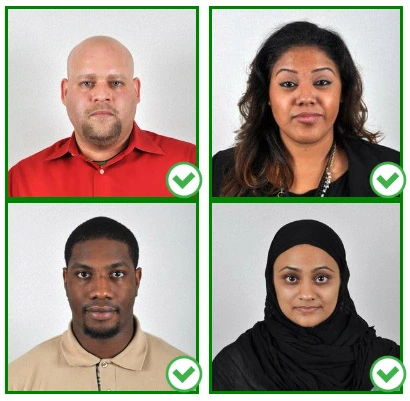
Step 2: Choose a venue with appropriate lighting
Face a bright window or the door when taking a photo. In this way, shadows can be avoided on the face and in the background. It is essential that the face is evenly lit. Ensure that the face is free of shadows and glares.
Note: You do not need to worry about the background, since our online passport photo generator will automatically do it for you.
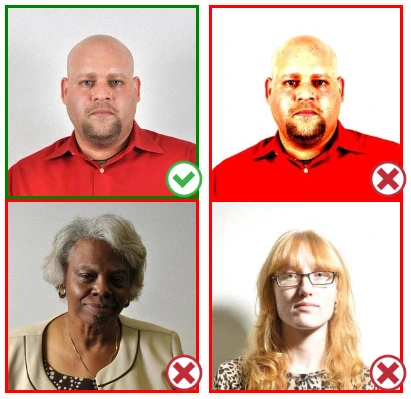
Step 3: Dress appropriately for your passport photo
Uniforms should not be worn. Put on regular street clothes for your photo.
Eyeglasses should not be worn. You should remove any sunglasses, tinted glasses, or glasses that you wear if you are taking a passport photo.
Ensure that your face is fully visible. Make sure your hair doesn't cover your face or obscure your eyes. In the case of very long bangs covering your eyebrows, pin them back with bobby pins. Although it's better to show your ears as well, that won't stop your photo from being accepted.
Passport photos don't allow hats unless they're religious headgear such as a headscarf or yarmulke.
Step 4: Pose for a passport photo
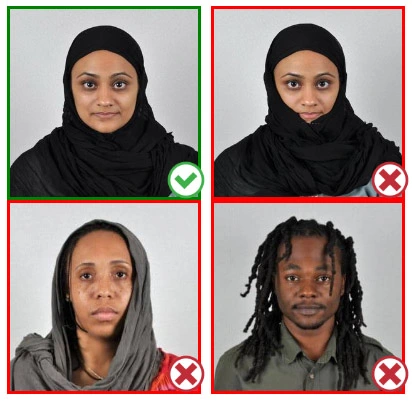
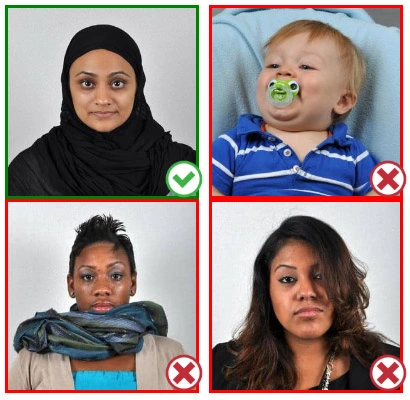
Face the camera straight on and look straight at it. Avoid tilting or rotating the head.
It is important that the shoulders are visible, and there should be enough space around the head to crop the picture.
Make sure the camera is at the same level as the head.
Step 5: Maintain neutral facial expressions
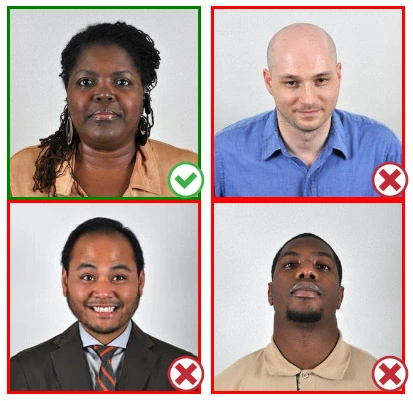
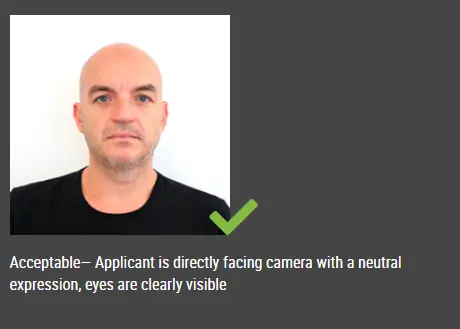
The government prefers you to have a neutral facial expression.
Under the new international passport rules, it is usually not acceptable to smile or have your mouth open.
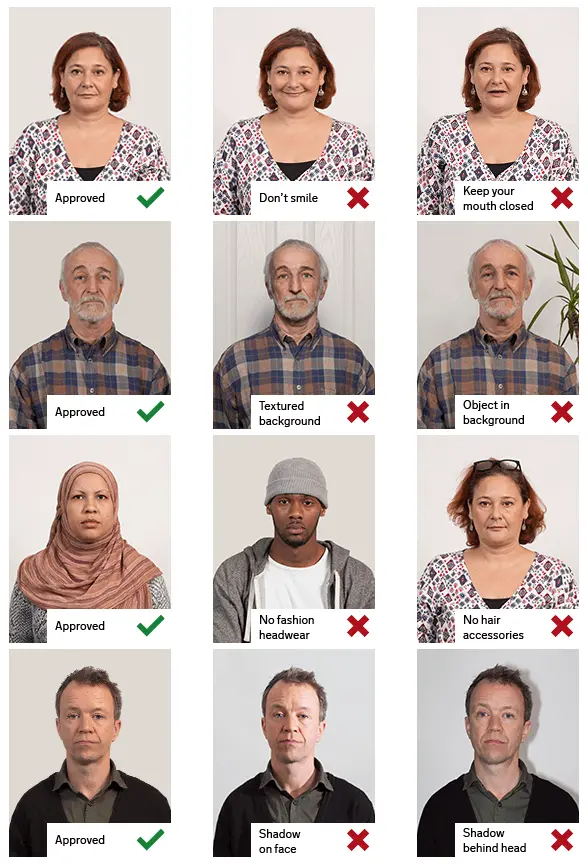
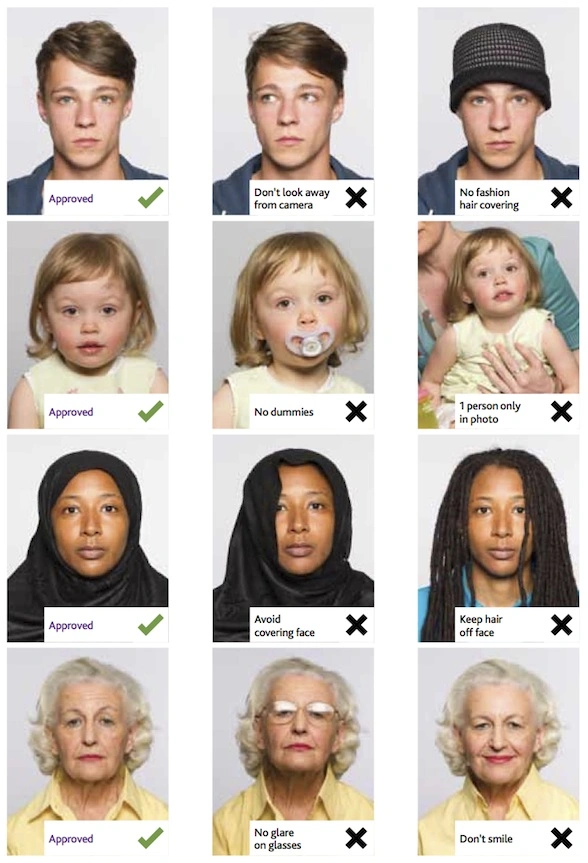
Good and bad examples of passport photos
This document is rated 5 / 5 - 7 Votes