United States Employment Authorization (2x2 inch) Photo Size Requirements and Online Tool
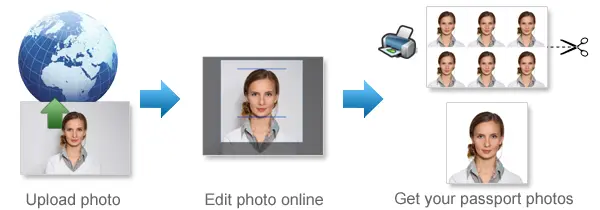
Make United States Employment Authorization Photos Online Now »
| Passport picture size | Width: 2 inch, Height: 2 inch |
| Resolution (DPI) | 600 |
| Background color | White |
| Printable photo | Yes |
| Digital photo for online submission | Yes |
| Digital photo size | Width: 1000 pixels , Height: 1000 pixels |
| Photo Paper type | matte |
Do not worry about the photo size requirements. Our online tool makes correct photos, ensuring the photo size and head size are correct. Background will be enhanced as well.
Last Update: July 30, 2026
EAD Photo Requirements 2026: USCIS Form I-765 Photo
USCIS EAD Photo Requirements for Form I-765
Prepare a correctly sized photo for your Employment Authorization Document application.
An EAD photo is a U.S. passport-style photo submitted with Form I-765, Application for Employment Authorization. Your photo must be recent, clear, correctly sized and taken against a plain white or off-white background.
EAD Photo Requirements at a Glance
Application: USCIS Form I-765
Printed photo size: 2 × 2 inches or 51 × 51 mm
Printed photos required: Two identical color passport-style photos for a paper Form I-765 filing
Head size: Between 1 inch and 1⅜ inches, or 25–35 mm, from the bottom of the chin to the top of the head
Background: Plain white or off-white
Photo type: Recent color photograph
Pose: Full face directly facing the camera
Expression: Neutral or natural expression, with both eyes open and mouth closed
Glasses: Remove all eyeglasses, sunglasses and tinted glasses
Head coverings: Generally not permitted except when worn for documented religious or medical reasons
Printed paper: Matte or glossy photo-quality paper
What Is an EAD Photo?
An Employment Authorization Document, commonly called an EAD or work permit, is issued by U.S. Citizenship and Immigration Services to eligible applicants who are authorized to work in the United States.
Form I-765 applicants may need to provide a recent passport-style photograph as part of their supporting evidence. The photo helps USCIS confirm the applicant’s identity and may be used on the Employment Authorization Document.
The EAD photo follows the standard U.S. passport-style composition: a square color image with the applicant facing forward against a plain white or off-white background.
How Many EAD Photos Do You Need?
For a paper Form I-765 application, USCIS instructions require two identical, recently taken color passport-style photographs.
If you are filing Form I-765 online, follow the photo-upload instructions displayed in your USCIS online account. The accepted file format, size and upload process may differ from the requirements for printed photos.
Always check the latest Form I-765 instructions for your eligibility category and filing method before submitting your application.
Correct EAD Photo Size
A printed EAD photo must measure exactly:
2 inches wide × 2 inches high or 51 mm wide × 51 mm high
The photo must be square. Do not stretch, compress or distort the image to make it fit.
The distance from the bottom of your chin to the top of your head, including your hair, should measure between:
1 inch and 1⅜ inches or 25 mm and 35 mm
Your head should be centered horizontally, and your complete head must remain visible. Hair may extend close to the edge of the photograph as long as the entire head is shown and the head size is correct.
EAD Photo Background Requirements
Your EAD photo must be taken against a background that is:
• White or off-white
• Plain and evenly colored
• Free from patterns, lines and visible textures
• Free from objects or other people
• Free from shadows
Stand several feet away from the wall to reduce shadows behind your head and shoulders.
Use a real white or off-white wall, sheet or backdrop when taking the photo. Do not rely on software to remove, replace, blur or artificially whiten the background.
Do Not Digitally Retouch Your EAD Photo
USCIS requires submitted photographs to be unretouched. This means the photograph must not be edited or digitally enhanced.
Do not use software, mobile applications, filters or artificial intelligence to:
• Change your facial features
• Smooth your skin
• Remove marks, scars or wrinkles
• Change your eye or hair color
• Correct red eye
• Add makeup
• Reshape your face or body
• Create missing parts of the image
• Stretch or compress your appearance
Cropping the original photograph to the correct square composition is different from altering your appearance. However, cropping must not remove part of your head, face, neck or shoulders.
If the lighting or background is unacceptable, take a new photograph instead of digitally repairing the image.
Pose and Facial Expression
Stand or sit directly in front of the camera.
Your photograph should show:
• Your full face facing the camera
• Your head straight and not tilted
• Your shoulders square to the camera
• Both eyes open and clearly visible
• Your mouth closed
• A neutral or natural facial expression
• Your complete face without hair or clothing covering it
A small natural smile may be acceptable when your mouth remains closed and your eyes are fully open. Avoid exaggerated expressions.
Glasses, Hats and Head Coverings
Remove all eyeglasses before taking your EAD photo. This includes:
• Prescription glasses
• Reading glasses
• Sunglasses
• Tinted glasses
• Glasses resting on top of your head
When glasses cannot be removed for a medical reason, check the current USCIS instructions regarding supporting medical documentation.
Hats and head coverings should generally be removed. A head covering may be permitted when it is worn daily for a religious purpose or is required for a medical reason.
When wearing an allowed head covering:
• Your complete face must remain visible
• The covering must not cast shadows on your face
• The covering must not obscure your hairline or facial features more than necessary
• You may need to provide a signed religious or medical statement
Face masks and other coverings that hide any part of the face are not acceptable.
Clothing and Accessories
Wear normal everyday clothing.
Avoid wearing:
• Uniforms
• Clothing that resembles a uniform
• Camouflage clothing
• Headphones
• Earbuds or wireless hands-free devices
• Large accessories that obscure your face
Jewelry and facial piercings may generally remain in place when they do not hide any part of your face.
Lighting and Photo Quality
Use soft, even lighting across your face.
Your EAD photo should be:
• Sharp and in focus
• Properly exposed
• Free from facial or background shadows
• Free from red eye
• Free from unusual color casts
• High enough in resolution to avoid visible pixels
• A natural representation of your skin tone and appearance
Avoid using a strong camera flash directly in front of your face. It can produce red eye, glare and harsh shadows.
Do not submit a blurry, grainy, pixelated, overexposed or underexposed image.
Printed EAD Photo Requirements
For a paper Form I-765 application, print your photographs on matte or glossy photo-quality paper.
The printed photographs should be:
• Exactly 2 × 2 inches
• Identical to each other
• Clear and correctly exposed
• Free from printer dots and visible pixels
• Free from scratches, stains, holes, creases and smudges
• Printed without borders
Do not print your EAD photo on ordinary document paper.
Review the current Form I-765 instructions before writing anything on the back of the photographs or attaching them to your application. Follow USCIS’s instructions for identifying and packaging the photographs.
How to Prepare Your EAD Photo with 123PassportPhoto
Use the 123PassportPhoto tool to prepare the size and crop of your EAD photograph.
Step 1: Select the United States EAD photo format
Step 2: Upload a recent photograph
Choose a clear, original photograph taken against a real white or off-white background.
Step 3: Check the crop
Make sure your complete head and face are visible and centered.
Step 4: Download the prepared photograph
Save the correctly sized image or print layout.
123PassportPhoto helps prepare the photograph’s crop and dimensions.
Common EAD Photo Mistakes
Incorrect photo size
A photograph that is not exactly 2 × 2 inches when printed may be rejected.
Head too large or too small
Your head must measure between 1 inch and 1⅜ inches from the bottom of the chin to the top of the head.
Shadows on the background
Standing too close to the wall can create a dark outline behind your head.
Poor image quality
Use a neutral or natural expression with your eyes open and mouth closed.
Altered appearance
Filters, skin smoothing, facial reshaping and other enhancements are not permitted.
OPT and STEM OPT EAD Photo Requirements
Applicants seeking Optional Practical Training or a STEM OPT extension generally file Form I-765 and must follow the applicable USCIS photo instructions.
The basic passport-style photo rules are the same:
• Recent color photograph
• Square composition
• White or off-white background
• Full face directed toward the camera
• Correct head size and position
• No glasses
• No digital retouching
Students should also review the current filing instructions from USCIS and their designated school official before submitting an OPT or STEM OPT application.
H-4 EAD Photo Requirements
Eligible H-4 dependent spouses applying for employment authorization use Form I-765.
The photographs submitted with a paper H-4 EAD application should follow the same passport-style standards described on this page. Applicants should review the current Form I-765 instructions for their eligibility category and supporting-document requirements.
Frequently Asked Questions
What size is an EAD photo?
A printed EAD photo must be exactly 2 × 2 inches, or 51 × 51 mm.
How many photographs do I need for Form I-765?
USCIS Form I-765 instructions require two identical passport-style photographs for paper filing. Online applicants should follow the photo-upload instructions provided in their USCIS accounts.
Can I use a passport photo for my EAD application?
Yes. A recent U.S. passport-style photograph may be used when it meets the current Form I-765 requirements and accurately represents your present appearance.
Can I take my EAD photo with my phone?
Yes. You may take the photo with a phone when it is clear, correctly composed and taken against a plain white or off-white background. Do not use portrait effects, filters or artificial intelligence enhancements.
Can I use a selfie?
A selfie is not recommended because close-range photographs can distort facial proportions and make correct positioning difficult. Ask another person to take the photograph from several feet away.
Can I wear glasses in my EAD photo?
No. Remove prescription glasses, reading glasses, sunglasses and tinted glasses unless USCIS permits an exception for a documented medical reason.
Can I smile in my EAD photo?
A natural expression or small closed-mouth smile may be acceptable. Your eyes must remain open and your mouth should be closed.
Can I wear a religious head covering?
A religious head covering may be permitted when it is worn daily. Your entire face must remain visible, and the covering must not cast shadows on your face. Review the current instructions regarding any required signed statement.
Does my EAD photo need to be taken professionally?
No. A professional photographer is not required, but the photograph must meet all USCIS size, composition, quality and appearance requirements.
How recent should my EAD photo be?
Submit a recently taken photograph that accurately reflects your current appearance. Check the latest Form I-765 instructions for any category-specific requirements.
If you want to make passport/visa photos for other countries, click the button below.
Make Passport/Visa Photo for Other Countries
How to make United States Employment Authorization photo online
Step 1: Take a picture with a digital camera or a smartphone
Make sure someone takes your passport photo for you. Selfies are not accepted. Make use of your tripod if you have one. By using a tripod, you will be able to keep the camera level and steady. Ideally, the person should be around 1 meter away from the camera.
Step 2: Choose a venue with appropriate lighting
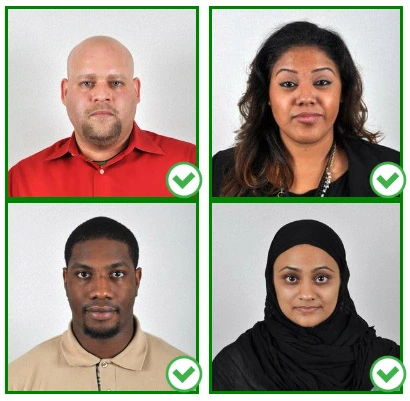
Face a bright window or the door when taking a photo. In this way, shadows can be avoided on the face and in the background. It is essential that the face is evenly lit. Ensure that the face is free of shadows and glares.
Note: You do not need to worry about the background, since our online passport photo generator will automatically do it for you.
Step 3: Dress appropriately for your passport photo
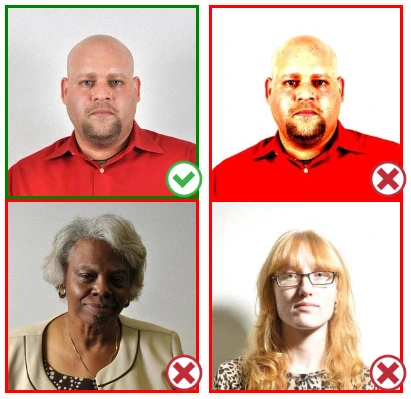
Uniforms should not be worn. Put on regular street clothes for your photo.
Eyeglasses should not be worn. You should remove any sunglasses, tinted glasses, or glasses that you wear if you are taking a passport photo.
Ensure that your face is fully visible. Make sure your hair doesn't cover your face or obscure your eyes. In the case of very long bangs covering your eyebrows, pin them back with bobby pins. Although it's better to show your ears as well, that won't stop your photo from being accepted.
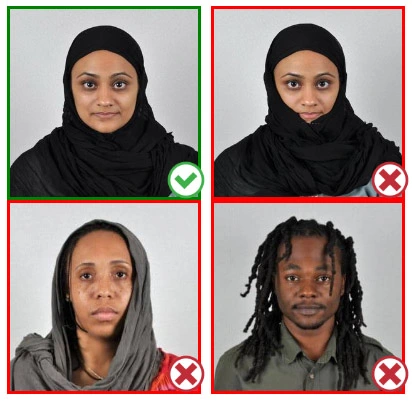
Passport photos don't allow hats unless they're religious headgear such as a headscarf or yarmulke.
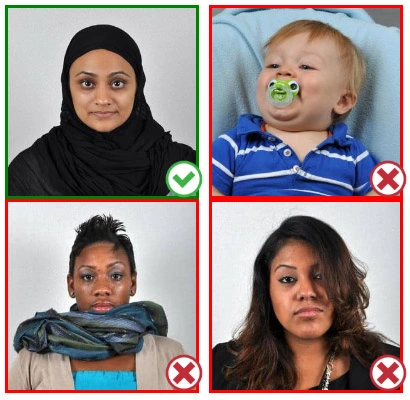
Step 4: Pose for a passport photo
Face the camera straight on and look straight at it. Avoid tilting or rotating the head.
It is important that the shoulders are visible, and there should be enough space around the head to crop the picture.
Make sure the camera is at the same level as the head.
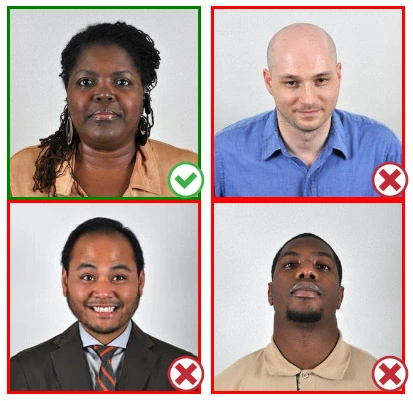
Step 5: Maintain neutral facial expressions
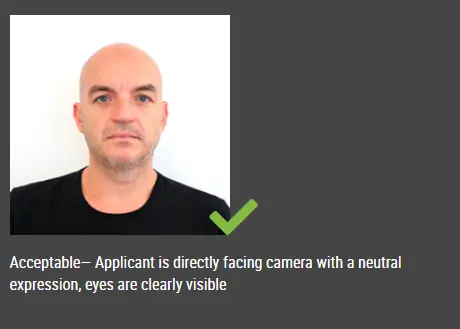
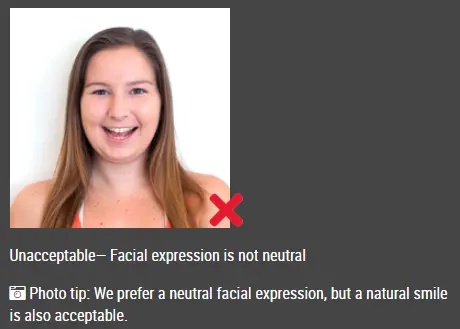
The government prefers you to have a neutral facial expression.
Under the new international passport rules, it is usually not acceptable to smile or have your mouth open.
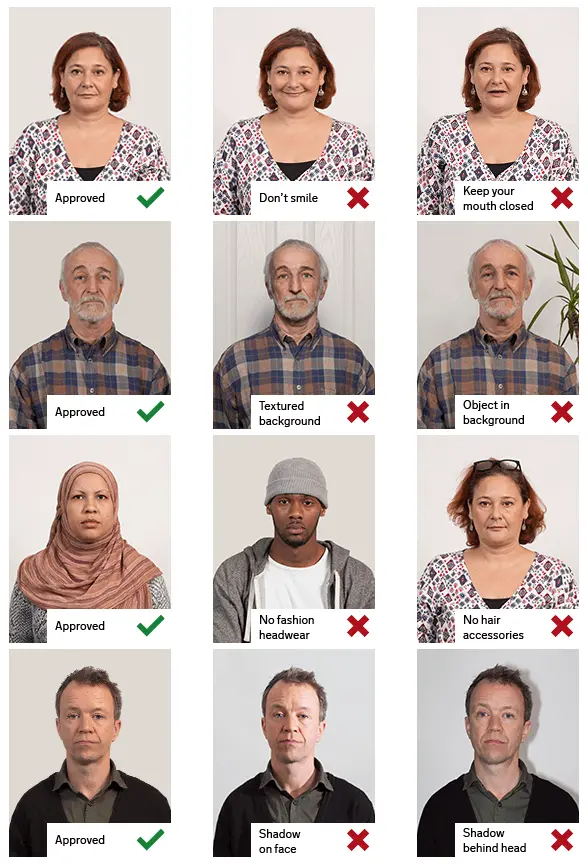
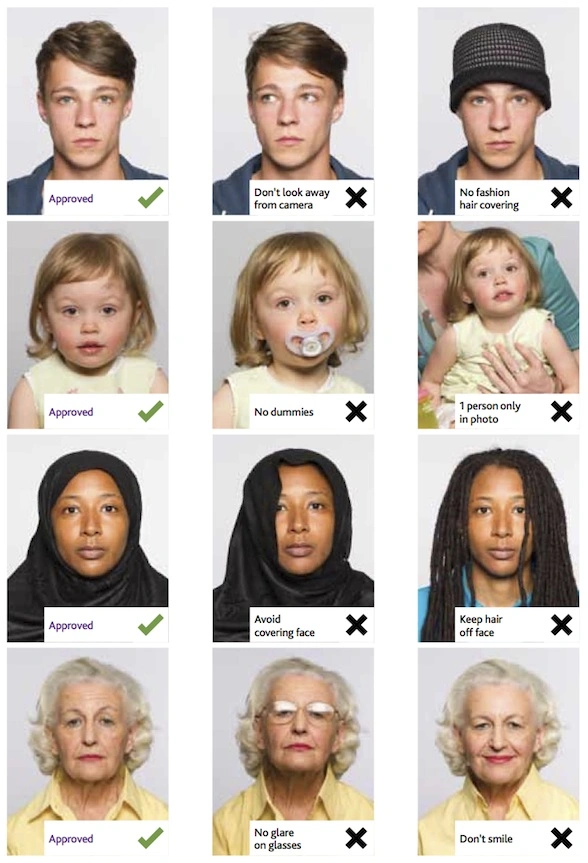
Good and bad examples of passport photos
Make United States Employment Authorization Photo Online Now »