New Zealand Visa (paper applications) (35x45 mm) Photo Size Requirements and Online Tool
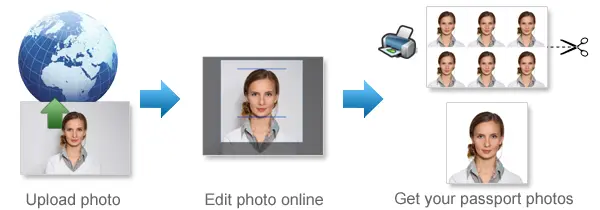
Make New Zealand Visa (paper applications) Photos Online Now »
| Passport picture size | Width: 35 mm, Height: 45 mm |
| Resolution (DPI) | 600 |
| Background color | White |
| Printable photo | Yes |
| Digital photo for online submission | Yes |
| Digital photo size | Width: 1800 pixels , Height: 2400 pixels |
| Photo Paper type | matte |
.jpg)
Do not worry about the photo size requirements. Our online tool makes correct photos, ensuring the photo size and head size are correct. Background will be enhanced as well.
Last Update: August 11, 2026
New Zealand Visa Photo Requirements for Paper Applications
For a New Zealand visa paper application, your photo must meet the size and quality requirements set by Immigration New Zealand.
The standard photo size is 35 mm wide × 45 mm high.
New Zealand Visa Photo Size
For paper applications, use a photo with these dimensions:
Width: 35 mm
Height: 45 mm
Size in centimetres: 3.5 × 4.5 cm
Size in inches: about 1.38 × 1.77 inches
Photo type: Colour
Orientation: Portrait
The photo should be printed at the correct size without stretching or changing the proportions of your face.
Face Position and Expression
Look directly at the camera with your head straight and your face centered in the photo.
Your face should take up about 70% to 80% of the image.
Keep a neutral expression with:
-
eyes open and clearly visible;
-
mouth closed;
-
head facing forward;
-
no noticeable head tilt;
-
no hair covering important facial features.
The photo should be sharp and clear, with your full face easy to recognise.
Background
Use a plain, neutral background.
There should be no patterns, furniture, doors, curtains, other people or objects visible behind you.
Make sure there is enough contrast between your face, clothing and the background.
Avoid shadows behind your head or across your face.
Lighting
Use even lighting so that both sides of your face are clearly visible.
Avoid: strong shadows, overexposed areas, harsh camera flash, dark areas on the face and red-eye.
Soft indoor lighting or natural daylight usually works well.
Glasses
You can wear prescription glasses as long as your eyes remain clearly visible.
Check that: the lenses are not tinted, there is no glare or reflection, the frames do not cover your eyes, your facial features remain easy to see.
Sunglasses should not be worn.
If your glasses create reflections, it may be easier to remove them for the photo.
Head Coverings
Head coverings should normally be removed unless they are worn for religious or medical reasons.
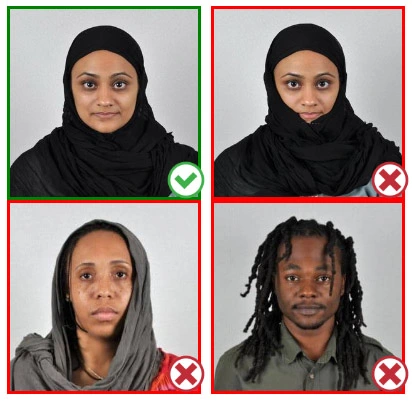
If you wear a head covering, your face must still be clearly visible. It should not cover your eyes, nose, mouth or the sides of your face.
What to Wear
Normal everyday clothing is fine.
Plain clothing usually works best. Avoid very strong patterns that may distract from your face.
It also helps to wear clothing that contrasts with the background.
Can You Take the Photo at Home?
Yes. You can take your New Zealand visa photo at home if the final photo meets the required size and appearance.
Avoid Beauty Filters
Do not use filters or editing tools that change your appearance.
Avoid anything that changes the shape or size of your eyes, nose, mouth, face or skin features.
Basic cropping and sizing are fine, but your facial appearance should remain natural.
How Many Photos Do You Need?
The number of photos can depend on the visa you are applying for.
Some New Zealand paper visa applications require two recent colour photographs for each applicant.
Check the instructions for your specific visa application before submitting your documents.
Photos for Babies and Children
Children and babies may also need a photo when they are included in a visa application.
The child's face should be clearly visible against a plain background.
No other person should appear in the photo.
For babies, make sure hands, toys, blankets or another person's face do not cover the child's facial features.
New Zealand Visa Photo FAQ
What size is a New Zealand visa photo?
For a paper visa application, the required photo size is 35 mm × 45 mm.
Is 35 × 45 mm the correct New Zealand visa photo size?
Yes. A paper application photo should measure 35 mm wide and 45 mm high.
How recent should the photo be?
Use a recent photo. Some paper visa applications require photos taken within the last six months.
Can I smile in a New Zealand visa photo?
A neutral expression is best. Keep your mouth closed and look directly at the camera.
What background should I use?
Use a plain, neutral background with no patterns, objects or other people visible.
Can I take the photo with my phone?
Yes. A phone camera can be used if the photo is clear, correctly lit and properly cropped. It is better to have someone else take the photo instead of using a selfie.
If you want to make passport/visa photos for other countries, click the button below.
Make Passport/Visa Photo for Other Countries
How to make New Zealand Visa (paper applications) photo online
Step 1: Take a picture with a digital camera or a smartphone
Make sure someone takes your passport photo for you. Selfies are not accepted. Make use of your tripod if you have one. By using a tripod, you will be able to keep the camera level and steady. Ideally, the person should be around 1 meter away from the camera.
Step 2: Choose a venue with appropriate lighting
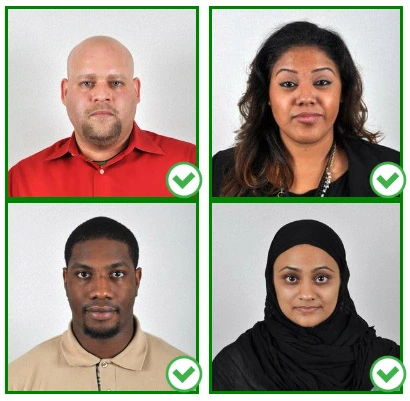
Face a bright window or the door when taking a photo. In this way, shadows can be avoided on the face and in the background. It is essential that the face is evenly lit. Ensure that the face is free of shadows and glares.
Note: You do not need to worry about the background, since our online passport photo generator will automatically do it for you.
Step 3: Dress appropriately for your passport photo
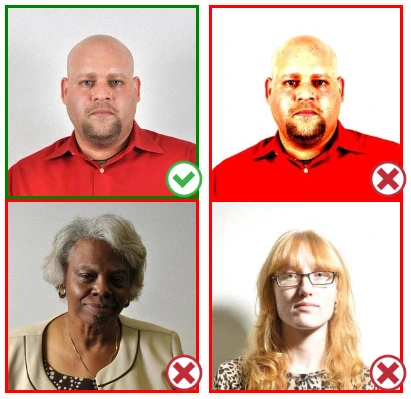
Uniforms should not be worn. Put on regular street clothes for your photo.
Eyeglasses should not be worn. You should remove any sunglasses, tinted glasses, or glasses that you wear if you are taking a passport photo.
Ensure that your face is fully visible. Make sure your hair doesn't cover your face or obscure your eyes. In the case of very long bangs covering your eyebrows, pin them back with bobby pins. Although it's better to show your ears as well, that won't stop your photo from being accepted.
Passport photos don't allow hats unless they're religious headgear such as a headscarf or yarmulke.
Step 4: Pose for a passport photo
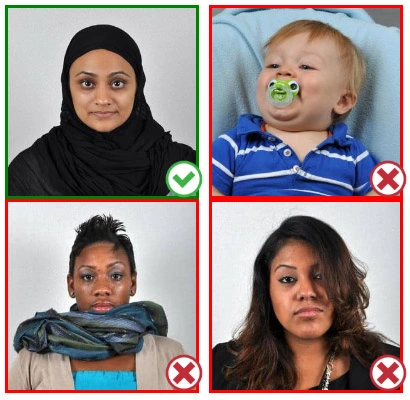
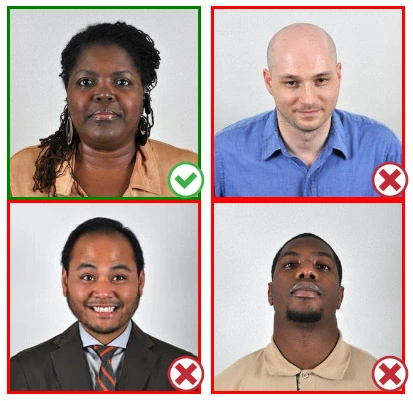
Face the camera straight on and look straight at it. Avoid tilting or rotating the head.
It is important that the shoulders are visible, and there should be enough space around the head to crop the picture.
Make sure the camera is at the same level as the head.
Step 5: Maintain neutral facial expressions
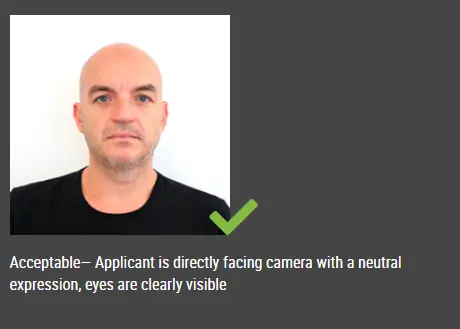
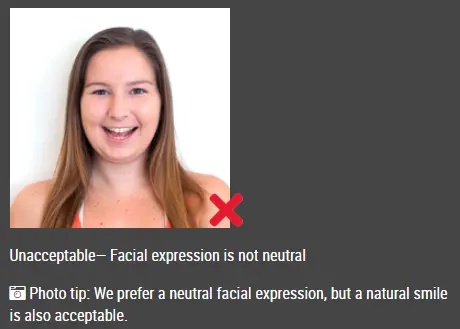
The government prefers you to have a neutral facial expression.
Under the new international passport rules, it is usually not acceptable to smile or have your mouth open.
Good and bad examples of passport photos
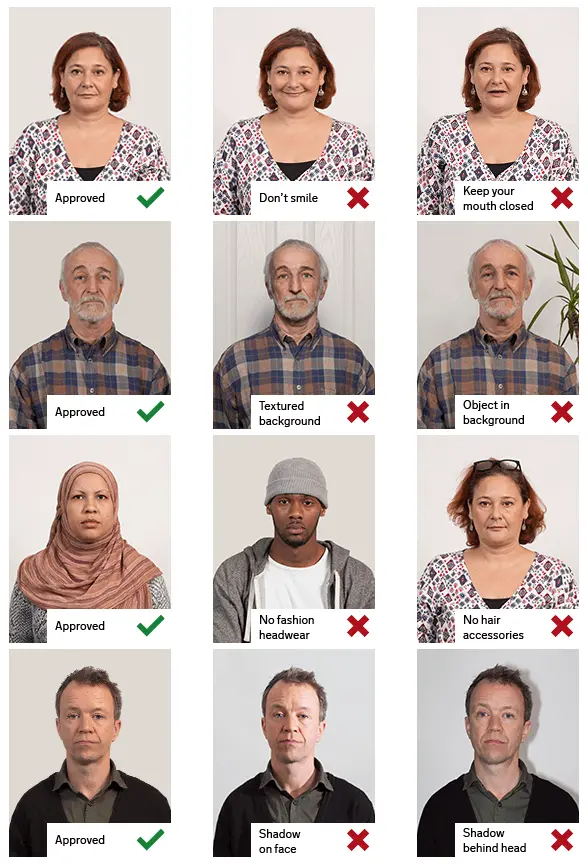
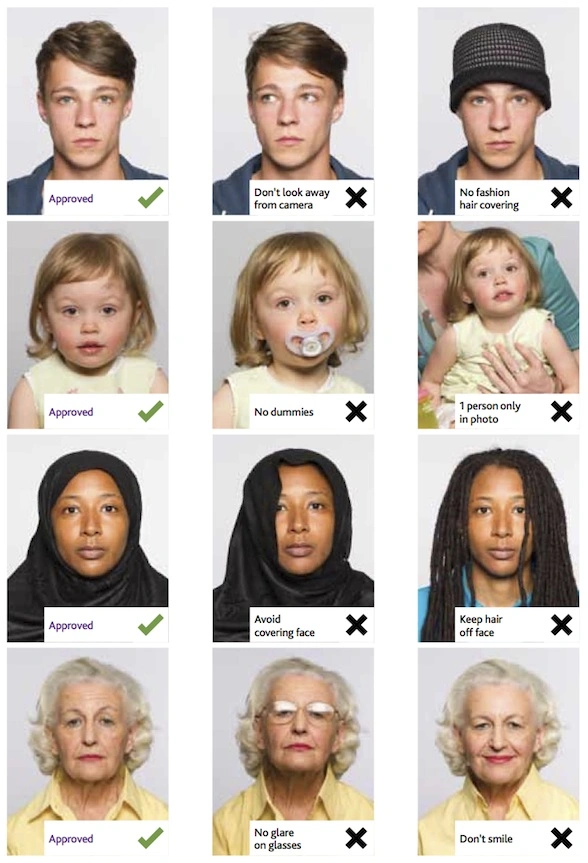
Make New Zealand Visa (paper applications) Photo Online Now »