Ireland Passport (online applications, 715x951px) (35x45 mm) Photo Size Requirements and Online Tool
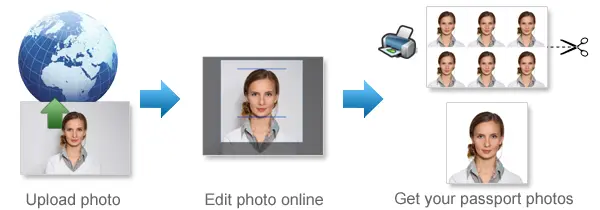
Make Ireland Passport (online applications, 715x951px) Photos Online Now »
| Passport picture size | Width: 35 mm, Height: 45 mm |
| Resolution (DPI) | 600 |
| Background color | White |
| Printable photo | Yes |
| Digital photo for online submission | Yes |
| Digital photo size | Width: 715 pixels , Height: 951 pixels |
| Photo Paper type | matte |
Do not worry about the photo size requirements. Our online tool makes correct photos, ensuring the photo size and head size are correct. Background will be enhanced as well.
Last Update: July 31, 2026
Irish Passport Photo Requirements for Online Applications
Applying for an Irish passport online? Your photo needs to meet the Passport Service’s digital photo rules before it can be accepted.
For an online application, the photo must be at least 715 × 951 pixels, saved as a JPEG, and no larger than 9 MB.
Use the guide below to check your photo before uploading it.
Quick Requirements
- Minimum size: 715 × 951 pixels
- Format: JPEG
- Maximum file size: 9 MB
- Photo must be in colour
- Taken within the last 6 months
- Plain light grey, white or cream background
- Face the camera directly
- Keep a neutral expression
- Keep your mouth closed
- Eyes must be clearly visible
- Photo must be sharp and well lit
- Do not use a scanned printed photo
- Avoid filters or changes to your appearance
Photo Size and File Requirements
Your digital photo must be at least 715 pixels wide and 951 pixels high.
It does not need to be exactly 715 × 951 pixels. Those are the minimum dimensions.
The file should be:
- JPEG format
- No larger than 9 MB
- Clear and in sharp focus
- Free from obvious compression or distortion
If you are taking the photo with a phone, use the original digital image rather than scanning a printed passport photo.
Background, Lighting and Expression
Use a plain light grey, white or cream background.
Make sure there are no visible objects, patterns or other people behind you. Strong shadows on the background should also be avoided.
Face the camera directly with your head straight.
Keep a natural, neutral expression with:
- Your mouth closed
- Your eyes open
- Your full face visible
The lighting should be even across your face. Avoid harsh shadows, glare, red-eye or very bright areas.
Can You Wear Glasses?
Yes, as long as your eyes can be seen clearly.
Check that:
- The frames do not cover your eyes
- There is no glare on the lenses
- The lenses are not tinted
If your glasses create reflections, removing them before taking the photo is usually the easiest option.
Hair and Head Coverings
Keep your hair away from your eyes so your face is clearly visible.
Head coverings should normally be removed unless they are worn for religious or medical reasons. Your facial features must still remain visible.
Can You Use a Selfie?
Do not use a selfie for your Irish passport application.
Have someone else take the photo instead. Selfies can create an unnatural camera angle or distort facial proportions.
Common Reasons Photos Are Rejected
Before uploading your photo, check for these common problems:
The image is too small
The photo must be at least 715 × 951 pixels.
The photo is blurry
Your eyes, face and facial features should be sharp and easy to see.
The background is unsuitable
Use a plain light grey, white or cream background without objects or patterns.
There are strong shadows
Avoid heavy shadows on your face or on the wall behind you.
Your expression is incorrect
Keep a neutral expression and your mouth closed.
Your eyes are obscured
Hair, glasses glare or shadows should not make your eyes difficult to see.
The image has been heavily edited
Do not use beauty filters, face reshaping or other edits that change your appearance.
The photo is a scan
For an online application, use an original digital photograph rather than a scan of a printed passport photo.
Babies and Children
Children also need a suitable passport photo.
For babies and young children:
- Make sure the child's face is clearly visible
- Use a plain background
- Do not include another person in the photo
- Keep hands, toys and other objects out of the picture
- Make sure the image is sharp and well lit
Very young babies may have some flexibility around facial expression, but the face should still be clearly visible.
Frequently Asked Questions
What size is an Irish passport photo for an online application?
The photo must be at least 715 × 951 pixels.
Does it have to be exactly 715 × 951 pixels?
No. These are the minimum dimensions.
Can I take the photo with an iPhone or Android phone?
Yes. A modern smartphone is fine as long as the photo meets the required size and quality rules.
Can I edit the photo?
Avoid filters, beauty effects or edits that change your facial appearance.
Create Your Irish Passport Photo
Upload your photo to our passport photo maker 123passportphoto.com and we prepare it for an Irish Passport Online application.
Before submitting it, check that the final image:
- Is at least 715 × 951 pixels
- Is saved as JPEG
- Is below 9 MB
- Has a suitable plain background
- Clearly shows your face and eyes
- Has good lighting
- Uses a neutral expression
Source: https://www.ireland.ie/en/dfa/passports/photo-guidelines/
If you want to make passport/visa photos for other countries, click the button below.
Make Passport/Visa Photo for Other Countries
How to make Ireland Passport (online applications, 715x951px) photo online
Step 1: Take a picture with a digital camera or a smartphone
Make sure someone takes your passport photo for you. Selfies are not accepted. Make use of your tripod if you have one. By using a tripod, you will be able to keep the camera level and steady. Ideally, the person should be around 1 meter away from the camera.
Step 2: Choose a venue with appropriate lighting
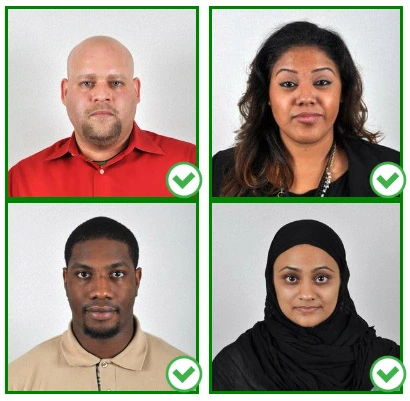
Face a bright window or the door when taking a photo. In this way, shadows can be avoided on the face and in the background. It is essential that the face is evenly lit. Ensure that the face is free of shadows and glares.
Note: You do not need to worry about the background, since our online passport photo generator will automatically do it for you.
Step 3: Dress appropriately for your passport photo
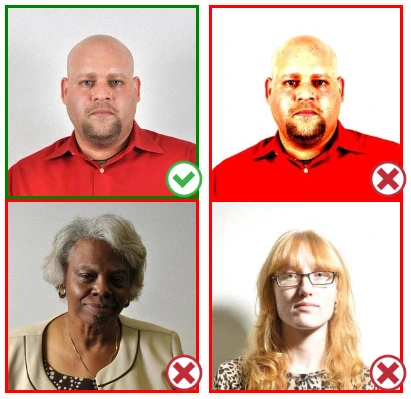
Uniforms should not be worn. Put on regular street clothes for your photo.
Eyeglasses should not be worn. You should remove any sunglasses, tinted glasses, or glasses that you wear if you are taking a passport photo.
Ensure that your face is fully visible. Make sure your hair doesn't cover your face or obscure your eyes. In the case of very long bangs covering your eyebrows, pin them back with bobby pins. Although it's better to show your ears as well, that won't stop your photo from being accepted.
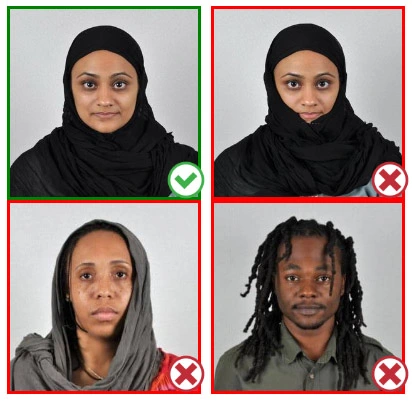
Passport photos don't allow hats unless they're religious headgear such as a headscarf or yarmulke.
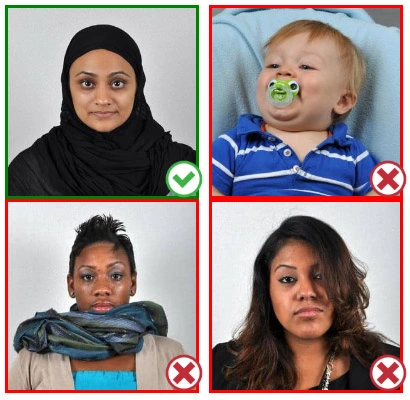
Step 4: Pose for a passport photo
Face the camera straight on and look straight at it. Avoid tilting or rotating the head.
It is important that the shoulders are visible, and there should be enough space around the head to crop the picture.
Make sure the camera is at the same level as the head.
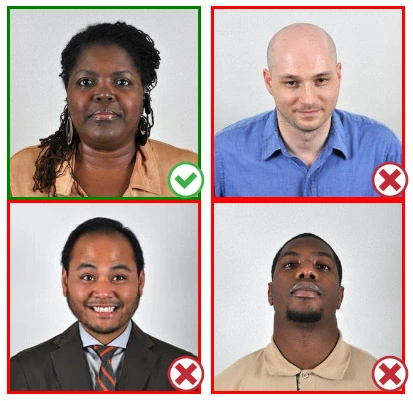
Step 5: Maintain neutral facial expressions
The government prefers you to have a neutral facial expression.
Under the new international passport rules, it is usually not acceptable to smile or have your mouth open.
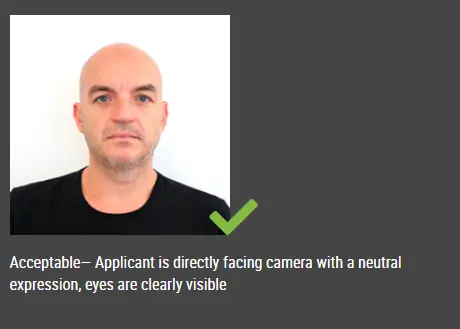
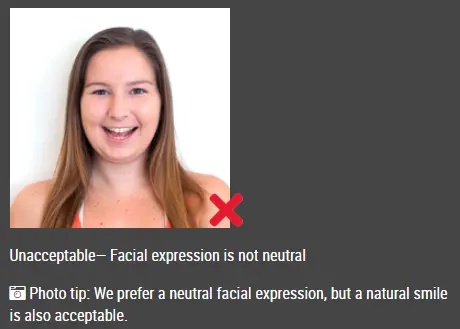
Good and bad examples of passport photos
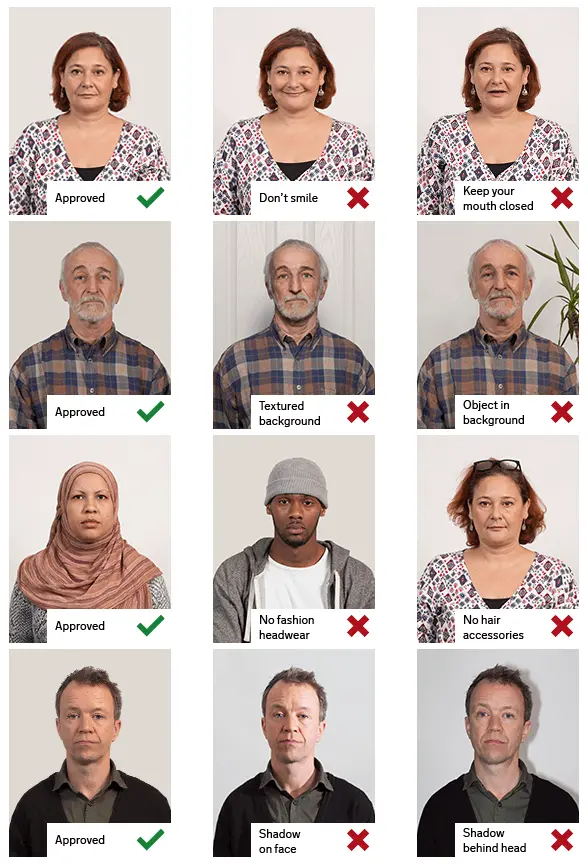
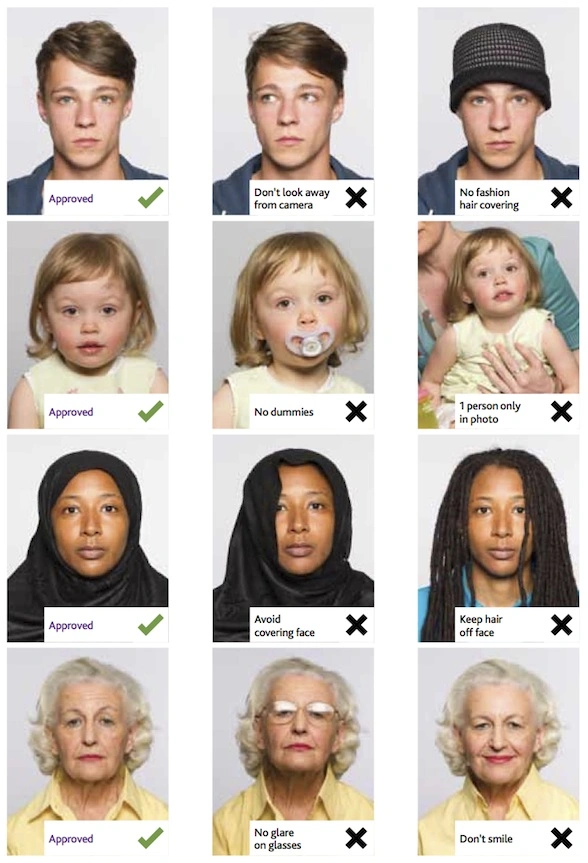
Make Ireland Passport (online applications, 715x951px) Photo Online Now »