
How to Avoid Passport Photo Rejection: The Ultimate Lighting & Shadow Guide.
Last Update: January 26, 2026
Taking your own passport photo at home is a great way to save money and a trip to the post office. However, if you don’t follow the rules strictly, your photo may be rejected. Most rejections don’t happen because of a bad camera. They happen because of many reasons, lighting is one of them.
If the government computer can’t clearly distinguish your features because of a shadow or a bright spot, your application will be flagged.
Follow this guide to set up your DIY "studio" to ensure your photo is accepted on the first try.
Mastering Shadows (Face and Background)
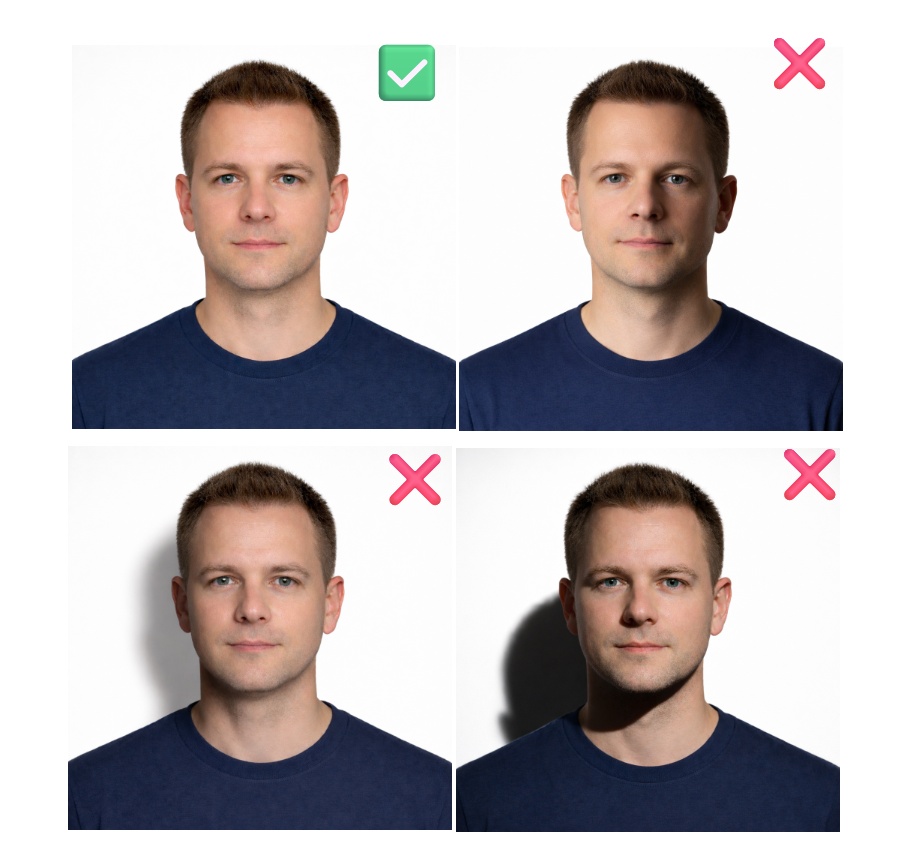
Shadows are the number one reason home-taken passport photos get rejected. Passport photo rules require flat lighting, meaning every part of your face must be equally visible, evenly lit, and shadow-free.
Flat lighting is not about beauty or style. It is about biometric clarity. If any part of your face is darker than the rest, the photo can fail automatic verification systems used by passport authorities.
No Shadows on the Face
Side lighting, such as sitting next to a lamp or window, may look good in everyday photos, but it is not allowed in passport photos. If one side of your face is darker, or if shadows appear around your eyes, nose, or cheeks, the photo is likely to be rejected.
How to fix it:
Stand directly facing your light source. If you are using a window, face it head-on. This allows light to reach both sides of your face evenly and prevents facial shadows.
Background “Halo” Shadow Behind the Head
Standing too close to a wall often creates a dark outline or “halo” behind your head. Background shadows are a common reason for passport photo rejection in many countries.
How to fix it:
Move 3 to 5 feet away from the wall. This distance allows light to spread evenly and keeps the background clean, bright, and shadow-free.
Chin Shadow From Overhead Lighting
Ceiling lights create strong downward shadows under the chin and around the eyes. These chin and eye socket shadows can distort facial features and cause rejection.
How to fix it:
Turn off all ceiling lights. Use eye-level lighting instead, such as facing a window or using a desk lamp positioned at the same height as your face.
Eliminating Glare and Reflections
Glare is essentially "white noise" for passport processors. When light bounces off your glasses or skin, it hides the very details the government needs to see.
The "Ghostly" Glasses Look
Most countries still allow you to wear prescription glasses, but your eyes must be 100% visible. If a window or lamp reflection covers your pupils, the photo is useless.
-
The Fix: Try tilting your glasses down slightly (the "librarian" look) or moving your light source higher. If the glare won't budge, it’s always safer to take the glasses off. Most digital passport systems won't penalize you for being "spectacle-free" in the photo, but they will reject a photo with obscured eyes.
Flash Glare and "Hot Spots"
That tiny bulb on your smartphone" the flash" is too concentrated for a passport photo. It usually creates a bright white "hot spot" on your forehead or nose. This will create a loss of data in the digital file.
-
The Fix: Disable your flash entirely. Rely on soft, natural light. If you must use a lamp, don't point it directly at your face; point it at the wall opposite you so that it "bounce" the light back toward you softly.
Shiny Skin and Jewelry
You might not notice it in the mirror, but the camera picks up skin oils and metallic jewelry as tiny mirrors. High-gloss lipstick or a shiny watch can create distracting reflections.
-
The Fix: Before you snap the photo, use a blotting paper or a simple tissue to pat down your forehead, nose, and chin. If you’re wearing large, reflective earrings, consider removing them. The goal is a "matte" look, nothing should be sparkling or glowing.
Quick Self-Check Before Submitting
-
Is your face evenly lit on both sides?
-
Are there any shadows on your face or behind your head?
-
Are your eyes fully visible with no glare?
-
Is your skin free of shiny reflections?
If the answer to any is “no,” retake the photo.
FAQ
Can I take a passport photo at home?
Yes, many countries allow it, as long as the photo meets lighting and quality rules.
Will shadows cause my passport photo to be rejected?
Yes. Shadows on your face or background are one of the most common rejection reasons.
Is glare on glasses allowed?
No. Any glare that hides your eyes will cause rejection.
Is natural light better than indoor light?
Natural light is fine if it is even and does not create shadows or glare.