
Can you smile in a UK passport photo?UK Rules Explained
Last Update: June 11, 2026
You can get almost everything right on a UK passport application and still run into trouble over one small thing: the photo.
Smiling is one of the easiest mistakes to make. It feels natural, especially if you are using a photo booth or taking a picture at home. But passport photos are not treated like normal pictures.
Quick answer: No, you should not smile in a UK passport photo. UK passport photo rules require a plain expression, a closed mouth, and a clear view of your face.
That means no teeth, no open-mouth smile, and no obvious grin. The safest passport photo is usually the one that looks plain, clear, and slightly serious.
Can You Smile in a UK Passport Photo?
You should not smile in a UK passport photo.
GOV.UK passport photo guidance says your photo should show a plain expression, with your mouth closed and your eyes open and visible. You should face the camera directly and look straight ahead.
A calm, relaxed face is fine. Anything that clearly looks like a smile is where the photo may become a problem.
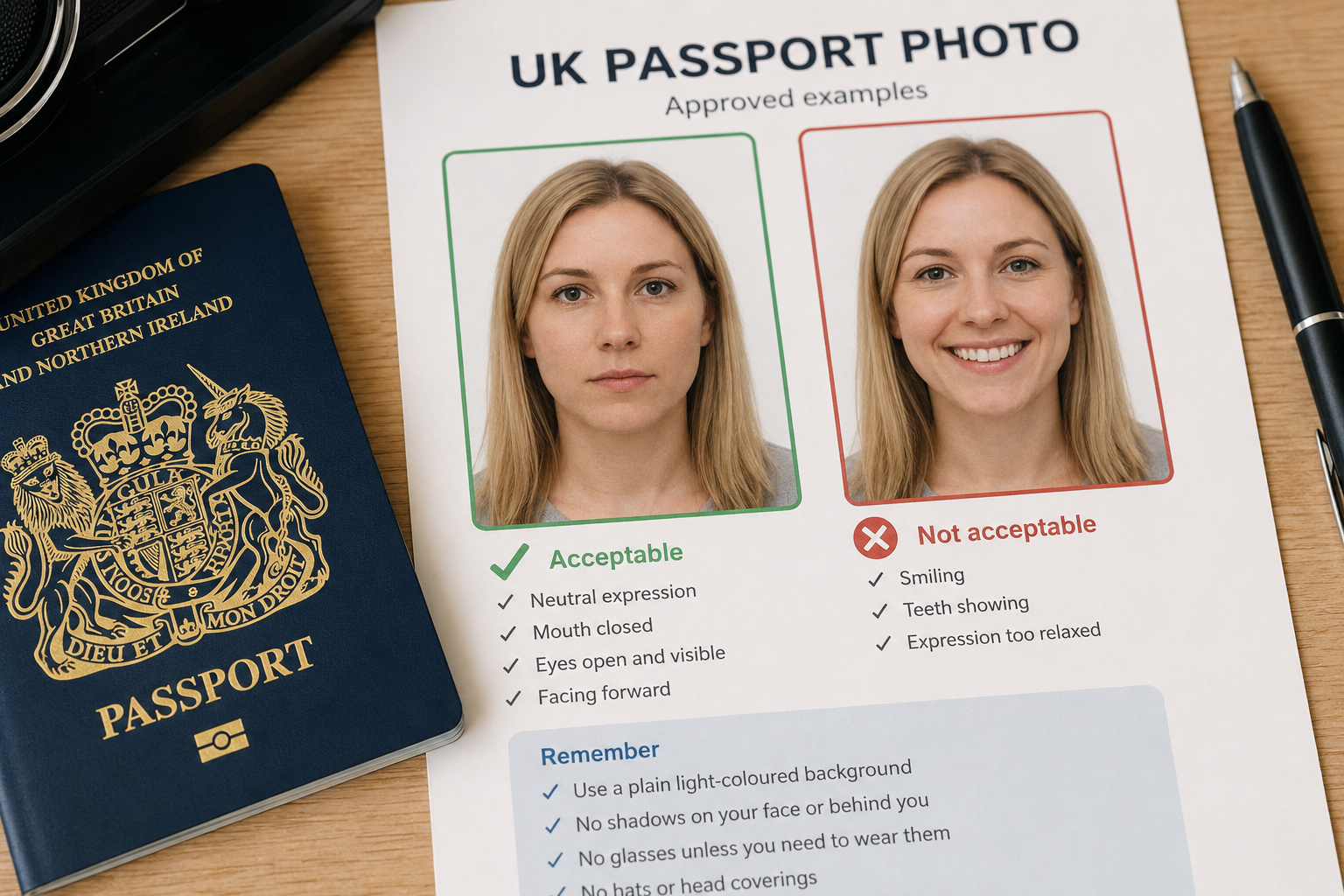
Why Smiling Can Be a Problem?
A passport photo is used to identify you. It is not taken for the same reason as a normal picture.
When you smile, your face changes shape. Your cheeks lift, your eyes may narrow, and your mouth looks different. If your teeth are showing, the photo is even less likely to meet the rules.
That is why UK passport photo requirements ask for a plain expression. The photo needs to show your face clearly and consistently, without posing, laughing, frowning, or smiling.
Is a Small Smile Allowed?
It is better not to risk it.
A closed-mouth smile might seem harmless, but it can still make your expression look too smiley. If your cheeks are raised, your eyes look narrowed, or the photo clearly looks like you are smiling, take another one.
Avoid:
-
Showing your teeth
-
Opening your mouth
-
Grinning
-
Laughing
-
Raising your eyebrows
-
Squinting
-
Tilting your head
-
Trying to look extra friendly for the camera
UK Passport Photo Expression Rules
For most adults, a UK passport photo should show you:
-
Facing forward
-
Looking straight at the camera
-
With a plain or neutral expression
-
With your mouth closed
-
With your eyes open and visible
-
With your face fully clear
-
Without hair covering your eyes
-
Without shadows across your face
Before the photo is taken, sit or stand straight, keep your head level, and let your face settle. You do not need to look stern. You just need to avoid smiling, frowning, or posing.
A useful trick is to breathe out gently before the photo. It can help your expression relax without turning into a smile.
Can You Smile in a Digital UK Passport Photo?
Digital UK passport photos follow the same rule.
Taking the photo at home can make the process feel casual, but the standards are still official. A selfie, holiday photo, cropped group picture, or social media image is unlikely to be suitable.
For an online UK passport application, make sure the digital photo is:
-
Clear and in focus
-
In colour
-
Taken against a plain, light-coloured background
-
Taken in even lighting
-
Free from filters or editing
-
A clear, recent likeness of you
Keep your face forward, mouth closed, and expression neutral.
Can You Smile in a Printed UK Passport Photo?
Printed photos are treated the same way: plain expression, mouth closed.
Printed UK passport photos must be 45mm high by 35mm wide. A photo booth or professional photo shop will usually handle the sizing, but you still need to check your expression before accepting the final image.
Retake the photo if:
-
Your teeth are showing
-
Your mouth is open
-
Your face looks noticeably smiley
-
Your eyes are narrowed from smiling
-
Your head is tilted or turned
A booth may not always stop you from choosing a photo that fails the expression rule, so check it carefully before you leave.
What About Children and Baby Passport Photos?
The rules are more relaxed for young children.
Children under 6 do not need to have a plain expression or look directly at the camera. Babies under 1 do not need to have their eyes open.
Even so, the photo still needs to show the child clearly and alone. There should not be toys, dummies, hands, car seats, or another person visible in the image.
For children aged 6 and over, it is safest to follow the adult rule: neutral expression, mouth closed, eyes open, and looking at the camera.
Will a Smile Get Your Passport Photo Rejected?
It can.
If your photo does not meet the UK passport photo requirements, your application may be delayed while you provide a replacement. That can be frustrating, especially if you have travel plans coming up.
A rejected photo may mean taking a new picture, resubmitting it, and waiting longer for the application to move forward.
The expression rule is one of the easiest parts to control, so it is worth being strict before you upload or send the photo.
What If You Cannot Meet the Expression Rule?
Some people cannot meet every photo rule because of a disability or medical condition.
If you cannot keep a neutral expression, close your mouth, or meet another requirement for medical reasons, explain this as part of your application. You may need to provide supporting information.
That is different from choosing to smile for the photo. For most applicants, the standard expression rules still apply.
Final Answer: Should You Smile in a UK Passport Photo?
You should not smile in a UK passport photo.
Use a plain expression, keep your mouth closed, look directly at the camera, and make sure your eyes are open and visible.
It may not be your favourite photo, but that is normal for passport pictures.
FAQ: Smiling in a UK Passport Photo
Can I smile with my mouth closed in a UK passport photo?
It is better not to. A closed-mouth smile can still look like a smile. Aim for a neutral expression instead.
Can I show teeth in a UK passport photo?
No. Your mouth should be closed, so your teeth should not be visible.
Can children smile in a UK passport photo?
Children under 6 do not need to have a plain expression, so there is more flexibility. Children aged 6 and over should follow the usual neutral expression rule.
Can babies smile in a UK passport photo?
Babies have more relaxed rules. Babies under 1 do not need to have their eyes open, but the photo should still show the baby clearly and alone.
Can I smile in a digital UK passport photo?
No. Digital UK passport photos follow the same expression rules as printed passport photos.
What happens if I smile in my passport photo?
Your photo may be rejected, and your passport application may be delayed while you provide a new image.
What is the best facial expression for a UK passport photo?
A plain, neutral expression with your mouth closed and eyes open is best.
Do UK passport photo rules allow a natural expression?
Yes, but “natural” should still mean neutral. Do not grin, laugh, frown, show teeth, or pose for the camera.